
Deletion in B-Tree in Java
Deletion in B-Tree
Deletion in a BTree is one of the most advanced operations in tree data structures. Unlike Binary Search Trees, BTrees are self balancing multi way trees, commonly used in databases and file systems to manage large amounts of data efficiently.
In this article, we will explain deletion in a BTree in a simple and structured way, including the approach, algorithm, Java implementation, examples, edge cases, and best practices.

Deletion In B-Tree In Java
Why is Deletion Important in BTree?
Deletion is required to:
- Remove outdated records
- Maintain balanced structure
- Ensure efficient searching and insertion
- Support real world systems like:
- Databases (e.g., indexing)
- File systems
- Storage engines
Key Properties to Maintain:
While deleting, a BTree must ensure:
- Minimum number of keys in each node (except root)
- Tree remains balanced
- Keys remain sorted
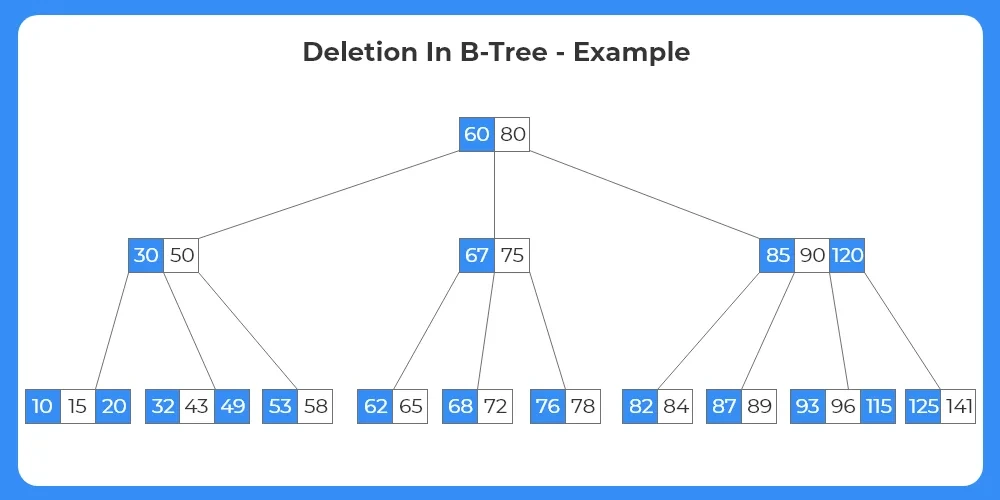
1. If the target key is at the leaf node:
If the target key is at the leaf node, we further study the given data to check if any of the following cases exist:
- Case 1: If the leaf node consists of the min number of keys according to the given degree/order, then the key is simply deleted from the node.
- Case 2: If the leaf contains the minimum number of keys, then:
- Case 2a: The node can borrow a key from the immediate left sibling node,if it has more than the minimum number of keys.The transfer of the keys take place through the parent node, i.e, the maximum key of the left sibling moves upwards and replaces the parent; while the parent key moves down to the target node from where the target key is simply deleted.
- Case 2b: The node can borrow a key from the immediate right sibling node, if it has more than the minimum number of keys.The transfer of the keys take place through the parent node, i.e, the minimum key of the right sibling moves upwards and replaces the parent; while the parent key moves down to the target node from where the target key is simply deleted.
- Case 2c: If neither of the siblings have keys more than the minimum number of keys required then, merge the target node with either the left or the right sibling along with the parent key of respective node.
2. If the target key is at the internal node:
If the target key is at an internal node, we further study the given data to check if any of the following cases exist:
- Case 1: If the left child has more than the minimum number of keys, the target key in the internal node is replaced by its inorder predecessor ,i.e, the largest element of the left child node.
- Case 2: If the right child has more than the minimum number of keys, the target key in the internal node is replaced by it’s inorder successor ,i.e, the smallest element of the right child node.
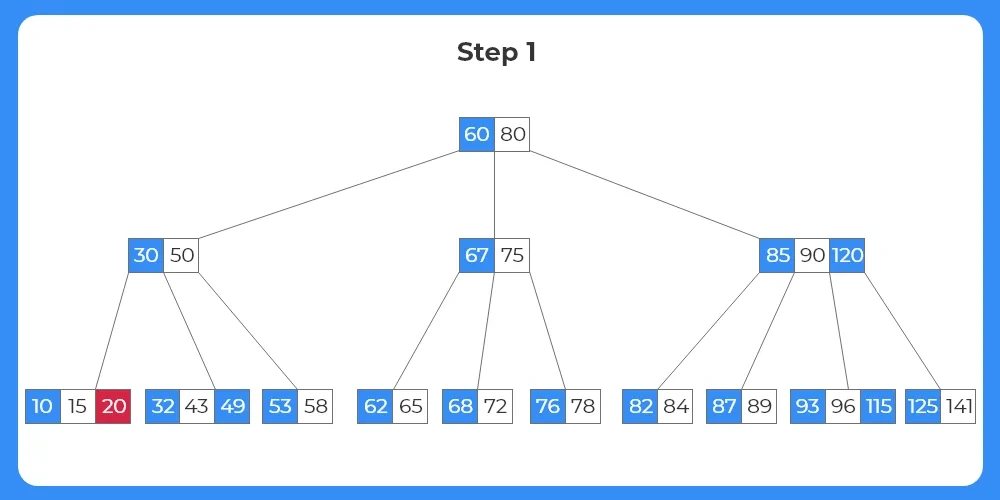
Step 1:
- The first element to be deleted from the tree structure is 20.
- We can see the key lies in the leaf node.
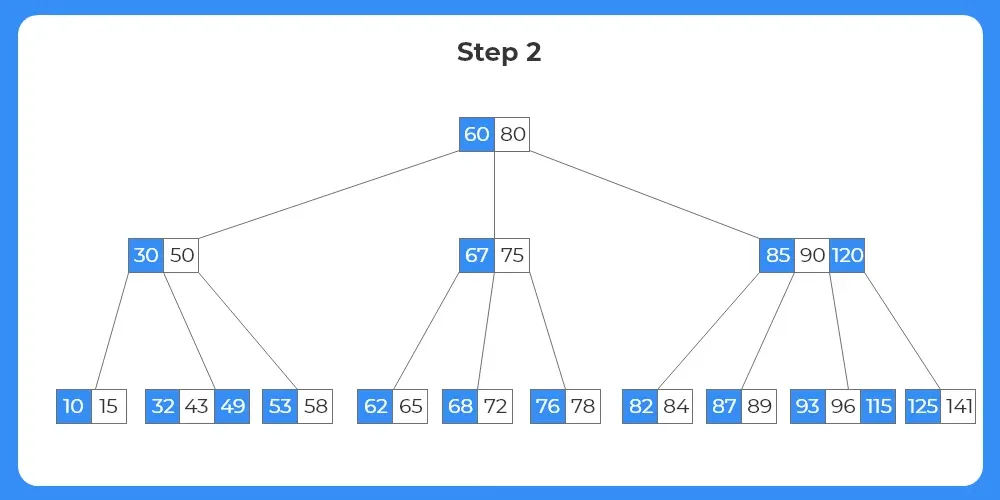
Step 2:
- The key 20 exists in a leaf node.
- The node has more than the minimum number of keys required.
- Thus the key is simply deleted from the node.
- The tree after deletion is shown as follows.
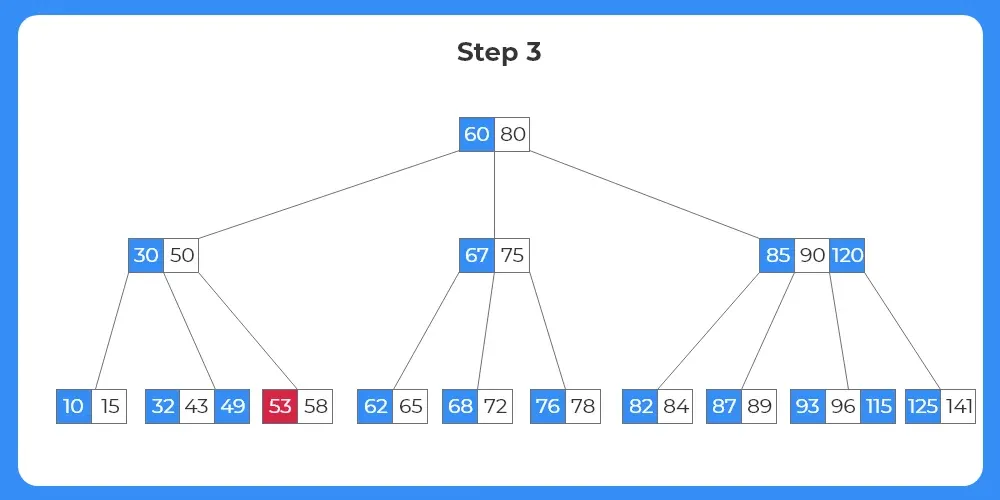
Step 3:
- The next element to be deleted from the tree is 53.
- We can see from the image that the key exists in the leaf node.
Step 4:
- Since the node in which the target key 53 exists has just the minimum number of keys, we cannot delete it directly.
- We check if the target node can borrow a key from it’s sibling nodes.
- Since the target node doesn’t have any right sibling, it borrows from the left sibling node.
- As we have studied above how the process of borrow and replace takes place, we apply it to the given structure.
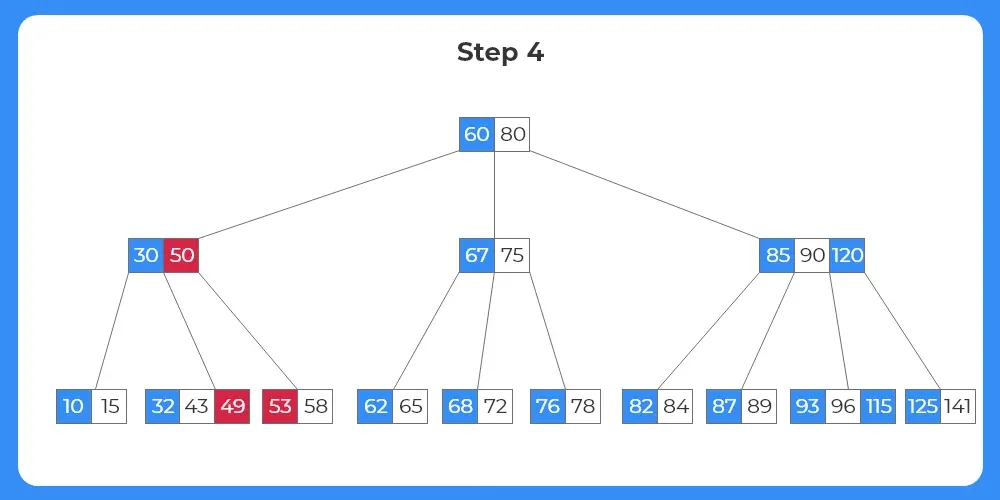
Step 5:
- The key 49 moves upwards to the parent node.
- The key 50 moves down to the target node.
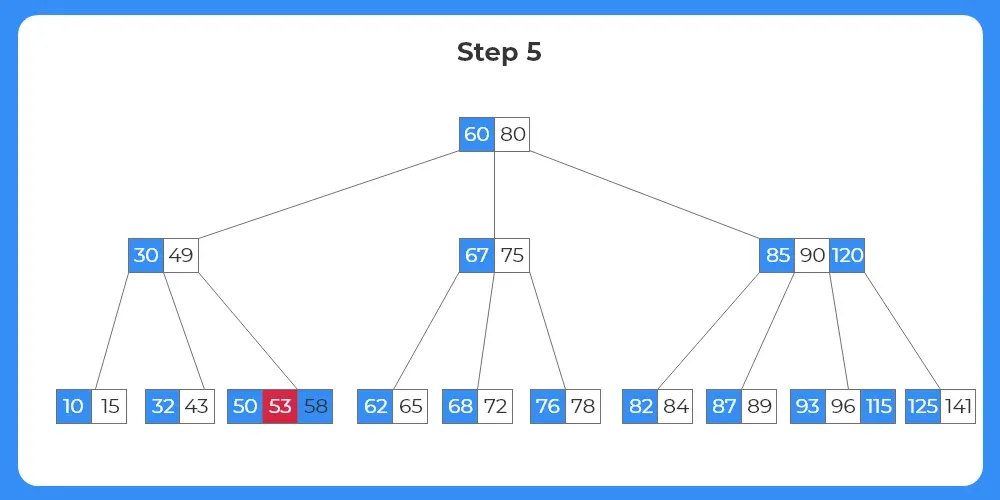
Step 6:
- Now, since the target node has keys more than the minimum number of keys required, the key can be deleted directly.
- The tree structure after deletion is shown as follows.
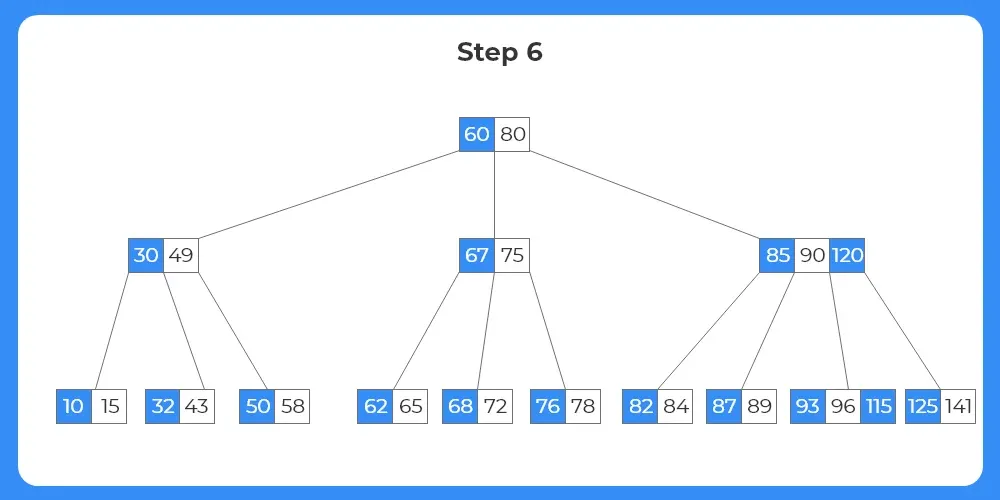
Step 7:
- The next element to be deleted is 89.
- The target key lies within a leaf node as seen from the image.
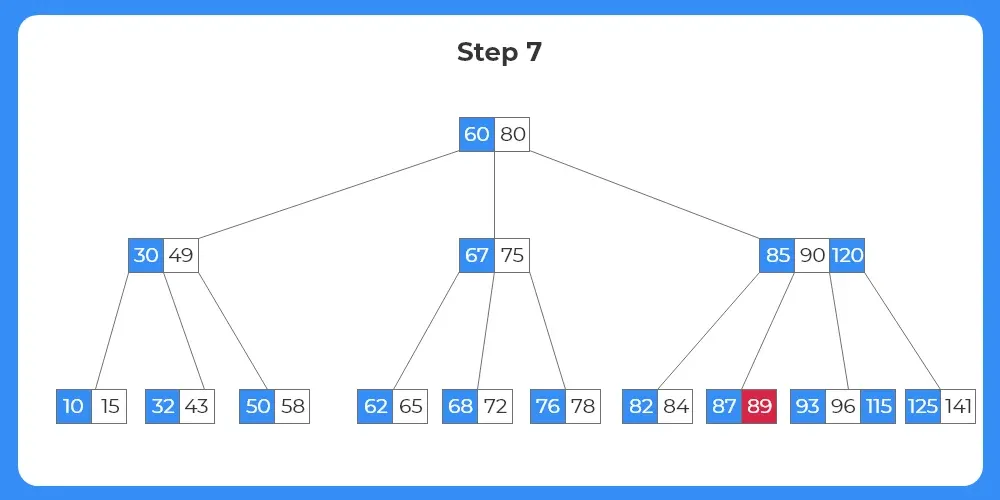
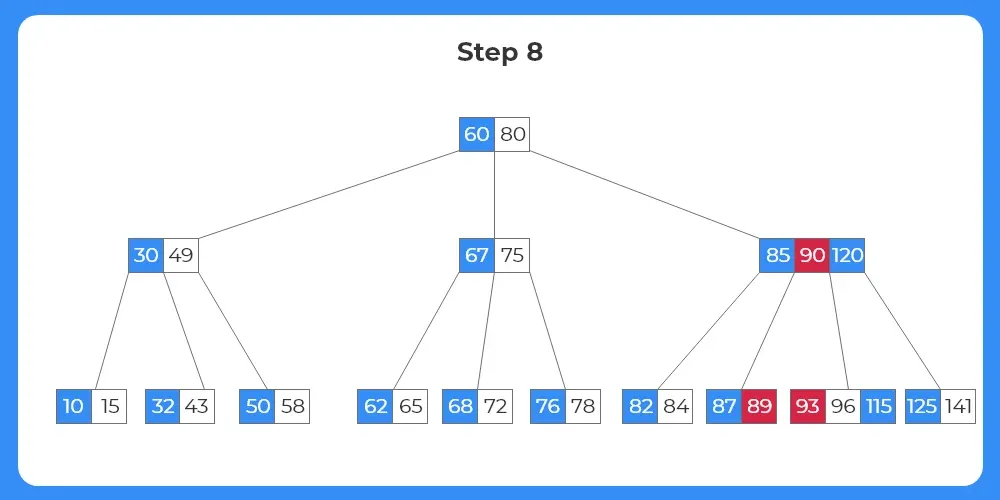
Step 8:
- Again, the target node holds just the minimum number of keys required and hence the node cannot be deleted directly.
- The target node now has to borrow a key from either of it’s siblings.
- We check the left sibling; it also holds just the minimum number of keys required.
- We check the right sibling node; it has one more than the minimum number of nodes so the target node can borrow a key from it.


Learn DSA
Prime Course Trailer
Related Banners
Get PrepInsta Prime & get Access to all 200+ courses offered by PrepInsta in One Subscription
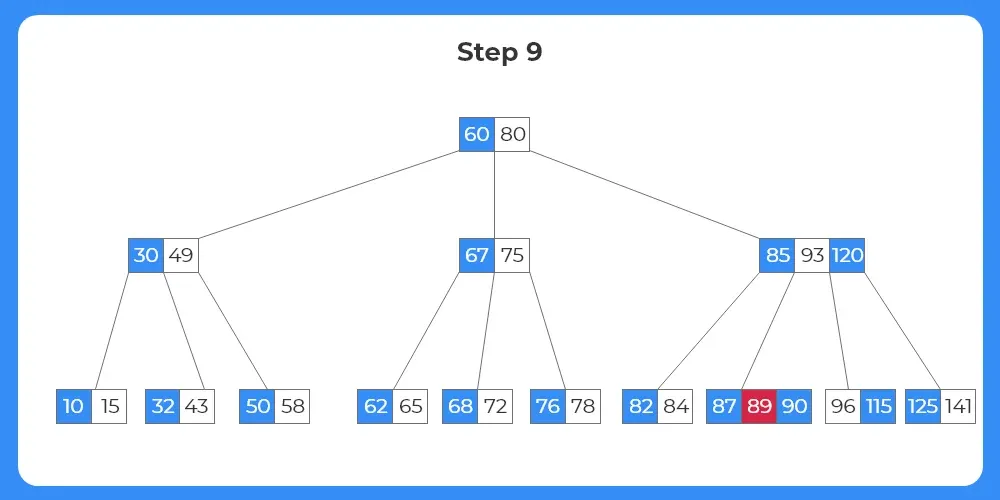
Step 9:
- The key 93 moves up to the parent node.
- The parent key 90 moves down to the target node.
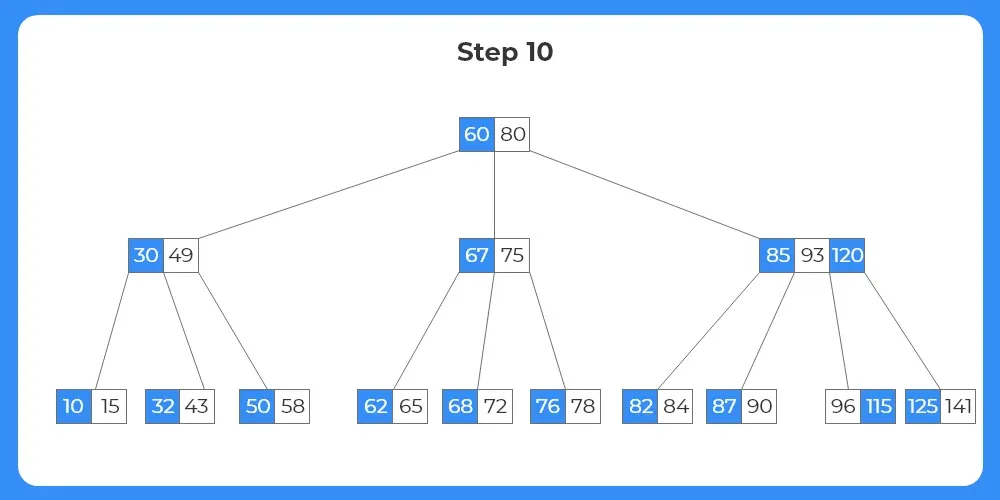
Step 10:
- Now, as the target node has sufficient number of keys the target key can directly be deleted from the target node.
- The tree structure after deletion is shown as follows.
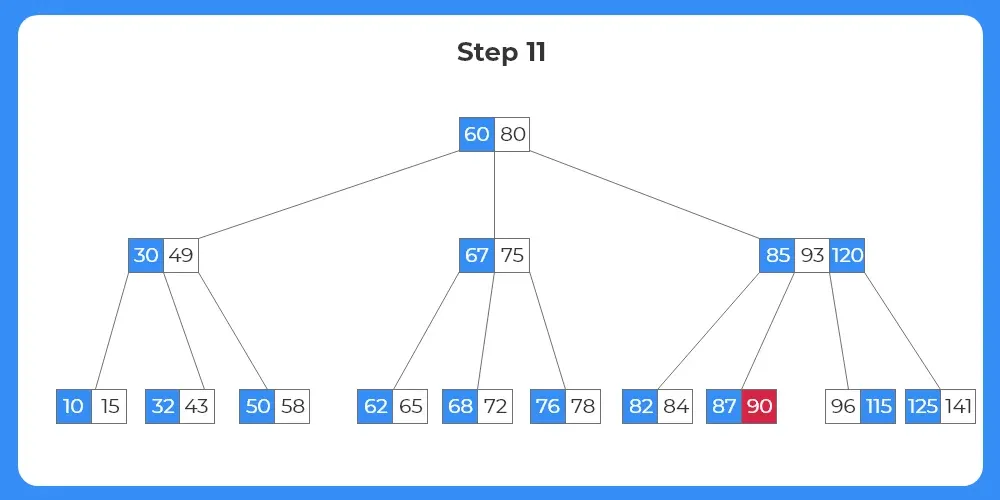
Step 11:
- The next key to be deleted is 90.
- The key exists within a leaf node as shown in the image.
Step 12:
- We can see that the target node has just the minimum number of keys.
- The target node has to borrow a key from either of it’s siblings.
- Since each of the siblings just have the number of the minimum keys, it cannot borrow the keys directly.
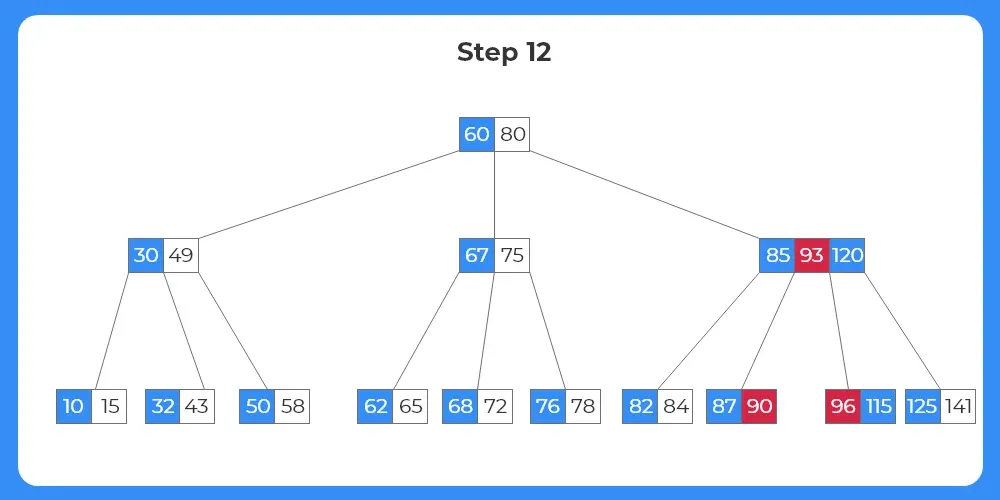
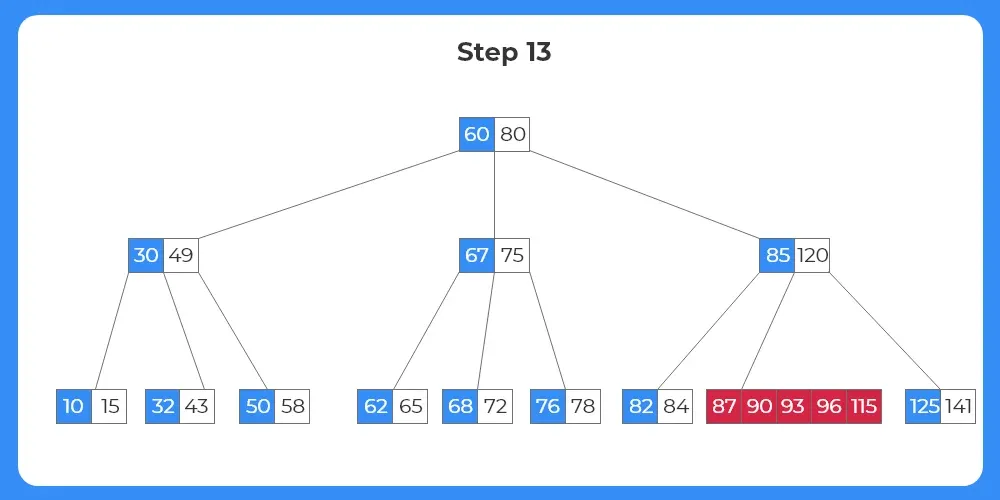
Step 13:
- Since the target node cannot borrow from either of the siblings, we merge the target node, either of the sibling node and the corresponding parent to them.
- The process of merging is shown as follows.
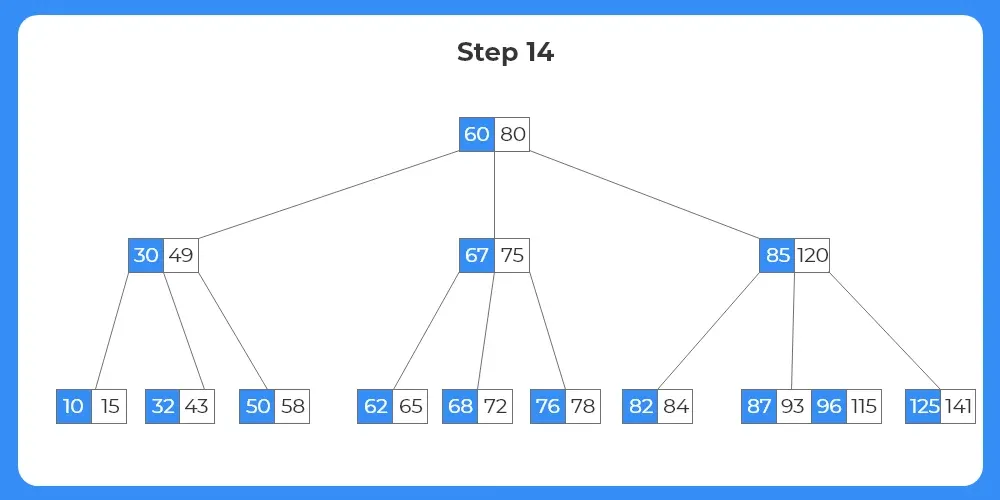
Step 14:
- Since the target node now has sufficient number of keys, the target key 90 can be deleted directly.
- The tree structure after the deletion of the element is shown as follows.
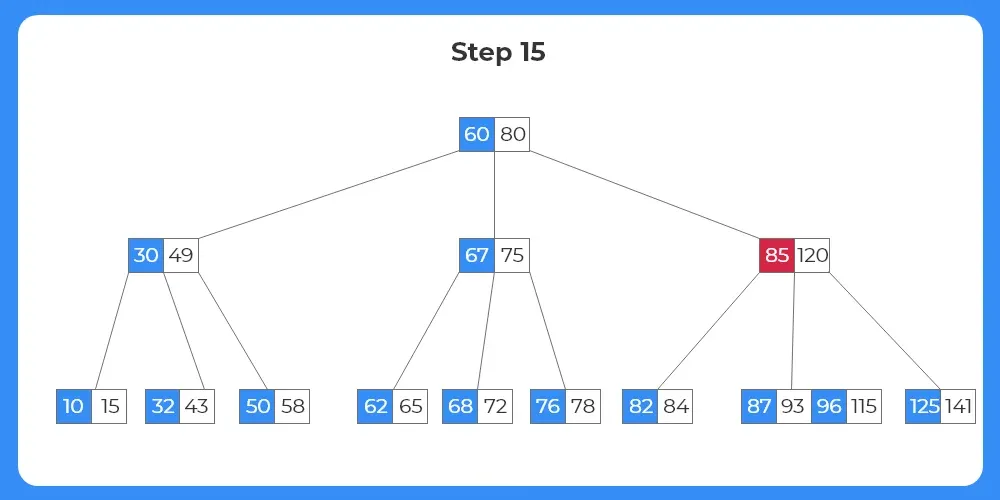
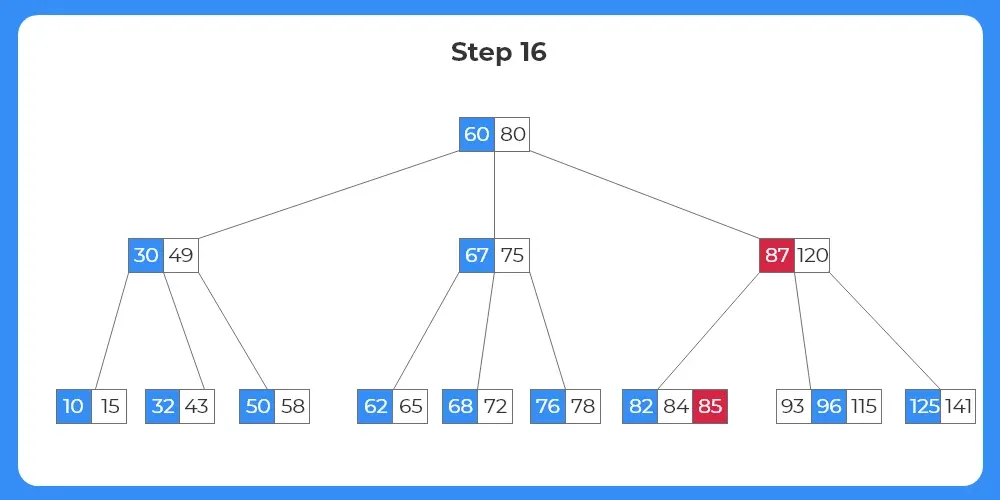
Step 15:
- The next target node is 85.
- Now here the node to be deleted is not a leaf node but an internal node.
Step 16:
- In case, when an internal node is to be deleted, we replace the key with it’s inorder predecessor or inorder successor.
- We can select either of the child nodes if they have sufficient number of keys.
- But as we can see in this case the target internal node can only borrow from it’s right child, i.e, inorder predecessor.
- The key 85 moves down to the child node; key 87 moves up to the parent node.
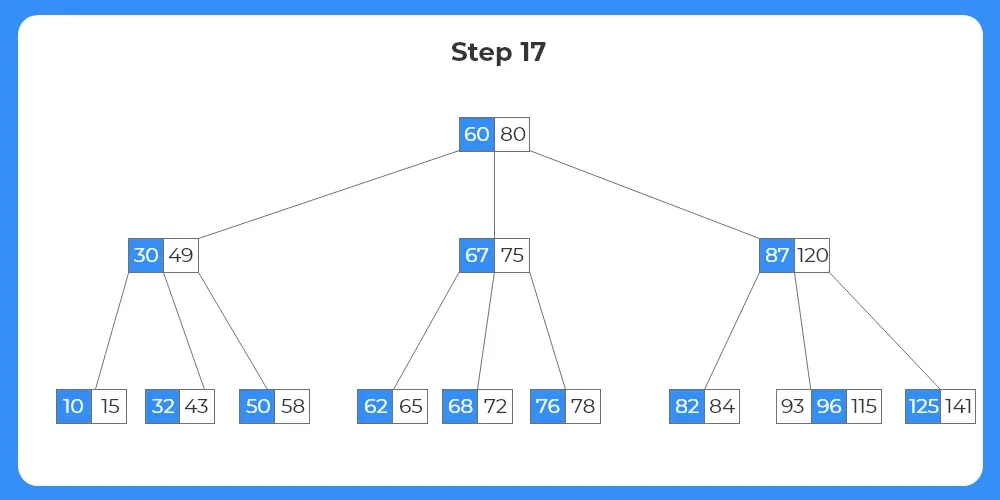
Step 17:
- Now, as the target key is moved to the leaf node, it can be simply deleted from the leaf node.
- The final tree structure after deletion of various nodes and preserving the b-tree properties is shown as follows.

Algorithm for Deletion In B-Tree In Java
Find the key in the tree
If key is in leaf → delete directly
If key is in internal node:
Replace with predecessor or successor
Recursively delete that key
- If node has less than minimum keys:
Try borrowing from siblings
If not possible → merge nodes
- Continue until tree is balanced
Java Code for Deletion In B-Tree In Java
import java.util.*;

class BTreeNode {
    int t; // Minimum degree
    int[] keys;
    BTreeNode[] children;
    int n;
    boolean leaf;

    BTreeNode(int t, boolean leaf) {
        this.t = t;
        this.leaf = leaf;
        this.keys = new int[2 * t - 1];
        this.children = new BTreeNode[2 * t];
        this.n = 0;
    }

    // Find key index
    int findKey(int k) {
        int idx = 0;
        while (idx < n && keys[idx] < k)
            ++idx;
        return idx;
    }

    // Remove key
    void remove(int k) {
        int idx = findKey(k);

        // Case 1: Key present in node
        if (idx < n && keys[idx] == k) {
            if (leaf)
                removeFromLeaf(idx);
            else
                removeFromNonLeaf(idx);
        } else {
            // If node is leaf
            if (leaf) {
                System.out.println("Key not found");
                return;
            }

            boolean flag = (idx == n);

            if (children[idx].n < t)
                fill(idx);

            if (flag && idx > n)
                children[idx - 1].remove(k);
            else
                children[idx].remove(k);
        }
    }

    void removeFromLeaf(int idx) {
        for (int i = idx + 1; i < n; ++i)
            keys[i - 1] = keys[i];
        n--;
    }

    void removeFromNonLeaf(int idx) {
        int k = keys[idx];

        if (children[idx].n >= t) {
            int pred = getPred(idx);
            keys[idx] = pred;
            children[idx].remove(pred);
        } else if (children[idx + 1].n >= t) {
            int succ = getSucc(idx);
            keys[idx] = succ;
            children[idx + 1].remove(succ);
        } else {
            merge(idx);
            children[idx].remove(k);
        }
    }

    int getPred(int idx) {
        BTreeNode cur = children[idx];
        while (!cur.leaf)
            cur = cur.children[cur.n];
        return cur.keys[cur.n - 1];
    }

    int getSucc(int idx) {
        BTreeNode cur = children[idx + 1];
        while (!cur.leaf)
            cur = cur.children[0];
        return cur.keys[0];
    }

    void fill(int idx) {
        if (idx != 0 && children[idx - 1].n >= t)
            borrowFromPrev(idx);
        else if (idx != n && children[idx + 1].n >= t)
            borrowFromNext(idx);
        else {
            if (idx != n)
                merge(idx);
            else
                merge(idx - 1);
        }
    }

    void borrowFromPrev(int idx) {
        BTreeNode child = children[idx];
        BTreeNode sibling = children[idx - 1];

        for (int i = child.n - 1; i >= 0; --i)
            child.keys[i + 1] = child.keys[i];

        if (!child.leaf) {
            for (int i = child.n; i >= 0; --i)
                child.children[i + 1] = child.children[i];
        }

        child.keys[0] = keys[idx - 1];

        if (!child.leaf)
            child.children[0] = sibling.children[sibling.n];

        keys[idx - 1] = sibling.keys[sibling.n - 1];

        child.n += 1;
        sibling.n -= 1;
    }

    void borrowFromNext(int idx) {
        BTreeNode child = children[idx];
        BTreeNode sibling = children[idx + 1];

        child.keys[child.n] = keys[idx];

        if (!child.leaf)
            child.children[child.n + 1] = sibling.children[0];

        keys[idx] = sibling.keys[0];

        for (int i = 1; i < sibling.n; ++i)
            sibling.keys[i - 1] = sibling.keys[i];

        if (!sibling.leaf) {
            for (int i = 1; i <= sibling.n; ++i)
                sibling.children[i - 1] = sibling.children[i];
        }

        child.n += 1;
        sibling.n -= 1;
    }

    void merge(int idx) {
        BTreeNode child = children[idx];
        BTreeNode sibling = children[idx + 1];

        child.keys[t - 1] = keys[idx];

        for (int i = 0; i < sibling.n; ++i)
            child.keys[i + t] = sibling.keys[i];

        if (!child.leaf) {
            for (int i = 0; i <= sibling.n; ++i)
                child.children[i + t] = sibling.children[i];
        }

        for (int i = idx + 1; i < n; ++i)
            keys[i - 1] = keys[i];

        for (int i = idx + 2; i <= n; ++i)
            children[i - 1] = children[i];

        child.n += sibling.n + 1;
        n--;
    }
}

class BTree {
    BTreeNode root;
    int t;

    BTree(int t) {
        this.root = null;
        this.t = t;
    }

    void remove(int k) {
        if (root == null) {
            System.out.println("Tree is empty");
            return;
        }

        root.remove(k);

        if (root.n == 0) {
            if (root.leaf)
                root = null;
            else
                root = root.children[0];
        }
    }

    public static void main(String[] args) {
        BTree tree = new BTree(3);

        // Example usage can be extended with insertion logic
        System.out.println("B-Tree deletion demo");
    }
}
Input:
Delete key → 15
Output:
Key removed and tree remains balanced
Space Complexity: O(log n) recursion stack

Frequently Asked Questions
Answer:
Deletion in B-Tree in Java is the process of removing a key while maintaining the balanced multi level structure of the BTree.
Answer:
Because nodes can have multiple keys, and deletion may require borrowing or merging nodes to maintain balance.
Answer:
The three main cases are deleting from a leaf node, deleting from an internal node, and handling node underflow using borrow or merge.
Answer:
It is O(log n) because the height of a BTree remains logarithmic.
Answer:
It is widely used in databases, file systems, and indexing systems where efficient disk access is required.
Get over 200+ course One Subscription
Courses like AI/ML, Cloud Computing, Ethical Hacking, C, C++, Java, Python, DSA (All Languages), Competitive Coding (All Languages), TCS, Infosys, Wipro, Amazon, DBMS, SQL and others
Introduction to Trees
Binary Trees
- Binary Tree in Data Structures (Introduction)
- Tree Traversals: Inorder Postorder Preorder : C | C++ | Java
- Inorder Postorder PreOrder Traversals Examples
- Tree Traversal without Recursion
Binary Search Trees
Traversals
- Traversal in Trees
- Tree Traversals: Breadth-First Search (BFS) : C | C++ | Java
- Tree Traversals: Depth First Search (DFS) : C | C++ | Java
- Construct a Binary Tree from Postorder and Inorder
B – Trees
AVL Trees
- AVL Trees
Complete Programs for Trees
- Depth First Traversals – C | C++ | Java
- Level Order Traversal – C | C++ | Java
- Construct Tree from given Inorder and Preorder traversals – C | C++ | Java
- Construct Tree from given Postorder and Inorder traversals – C | C++ | Java
- Construct Tree from given Postorder and Preorder traversal – C | C++ | Java
- Find size of the Binary tree – C | C++ | Java
- Find the height of binary tree – C | C++ | Java
- Find maximum in binary tree – C | C++ | Java
- Check whether two tree are identical- C| C++| Java
- Spiral Order traversal of Tree- C | C++| Java
- Level Order Traversal Line by Line – C | C++| Java
- Hand shaking lemma and some Impotant Tree Properties.
- Check If binary tree if Foldable or not.- C| C++| Java
- check whether tree is Symmetric – C| C++| Java.
- Check for Children-Sum in Binary Tree- C|C++| Java
- Sum of all nodes in Binary Tree- C | C++ | Java
- Lowest Common Ancestor in Binary Tree- C | C++ | Java
Introduction to Trees
Binary Trees
- Binary Tree in Data Structures (Introduction)
- Tree Traversals: Inorder Postorder Preorder : C | C++ | Java
- Inorder Postorder PreOrder Traversals Examples
- Tree Traversal without Recursion
Binary Search Trees
Traversals
- Traversal in Trees
- Tree Traversals: Breadth-First Search (BFS) : C | C++ | Java
- Tree Traversals: Depth First Search (DFS) : C | C++ | Java
- Construct a Binary Tree from Postorder and Inorder
B – Trees
AVL Trees
- AVL Trees
Complete Programs for Trees
- Depth First Traversals – C | C++ | Java
- Level Order Traversal – C | C++ | Java
- Construct Tree from given Inorder and Preorder traversals – C | C++ | Java
- Construct Tree from given Postorder and Inorder traversals – C | C++ | Java
- Construct Tree from given Postorder and Preorder traversal – C | C++ | Java
- Find size of the Binary tree – C | C++ | Java
- Find the height of binary tree – C | C++ | Java
- Find maximum in binary tree – C | C++ | Java
- Check whether two tree are identical- C| C++| Java
- Spiral Order traversal of Tree- C | C++| Java
- Level Order Traversal LIne by Line – C | C++| Java
- Hand shaking lemma and some Impotant Tree Properties.
- Check If binary tree if Foldable or not.- C| C++| Java
- check whether tree is Symmetric C| C++| Java.
- Check for Children-Sum in Binary Tree- C|C++| Java
- Sum of all nodes in Binary Tree- C | C++ | Java
- Lowest Common Ancestor in Binary Tree. C | C++ | Java


Login/Signup to comment