
Searching in Binary Tree in Java
Searching in Binary Tree
Here, we will understand how searching works in a Binary Tree in Java, including approach, algorithm, implementation, examples, and best practices.
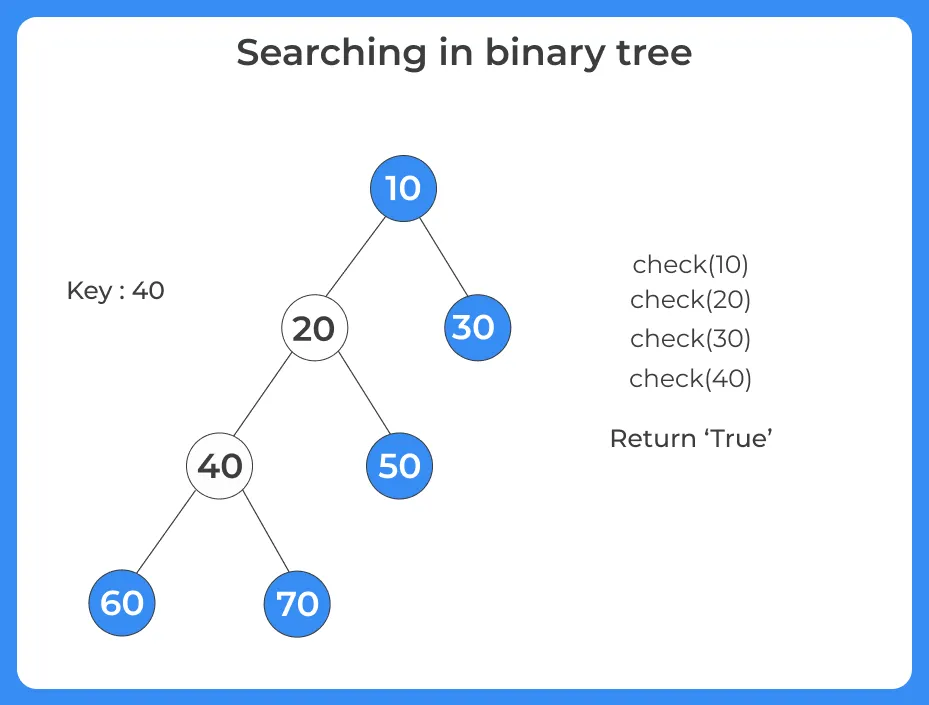
Searching in a Binary Tree means finding whether a given value exists in the tree or not. Unlike Binary Search Trees (BST), a normal binary tree does not follow any ordering rule, so we need to traverse the tree completely in the worst case.

What is a Binary Tree?
Binary Tree is a data structure where:
- Each node has at most two children (left and right)
- There is no specific ordering between nodes
Because of the lack of ordering, searching is different from BST.
Why is Searching Needed in Binary Tree?
Searching helps in:
- Finding a specific value
- Validating data existence
- Performing operations like deletion or update
- Used in:
Tree based problems
Game trees
Expression trees
Difference between Binary Tree vs BST Search
| Feature | Binary Tree | Binary Search Tree |
|---|---|---|
| Ordering | No ordering | Left < Root < Right |
| Search Approach | Traversal (DFS/BFS) | Binary search logic |
| Time Complexity | O(n) | O(log n) (balanced) |
Approach for Searching in Binary Tree
Since there is no order, we use:
1. DFS (Recursive Approach)
- Check current node
- Search left subtree
- Search right subtree
2. BFS (Level Order)
Traverse level by level using queue


Learn DSA
Prime Course Trailer
Related Banners
Get PrepInsta Prime & get Access to all 200+ courses offered by PrepInsta in One Subscription
Algorithm for Searching in Binary Tree (DFS Approach)
- If root is null → return false
- If root value equals key → return true
- Recursively search in left subtree
- Recursively search in right subtree
- If found in any → return true, else false
Explanation of Algorithm:
- Define Node class which has three attributes namely: data left and right. Here, left represents the left child of the node and right represents the right child of the node.
- When a node is created, data will pass to data attribute of the node and both left and right will be set to null.
- Define another class which has two attribute root and flag.
- Root represents the root node of the tree and initializes it to null.
- The Flag will be used to check whether the given node is present in the tree or not. Initially, it will be set to false.
- searchNode() will search for a particular node in the binary tree:
- It checks whether the root is null, which means the tree is empty.
- If the tree is not empty, it will compare temp?s data with value. If they are equal, it will set the flag to true and return.
- Traverse left subtree by calling searchNode() recursively and check whether the value is present in left subtree.
- Traverse right subtree by calling searchNode() recursively and check whether the value is present in the right subtree.
Pseudocode
search(node, key):
    if node == null:
        return false

    if node.data == key:
        return true

    return search(node.left, key) OR search(node.right, key)
Java Code for Searching in Binary Tree (DFS Approach)
class Node {
    int data;
    Node left, right;

    Node(int value) {
        data = value;
        left = right = null;
    }
}

public class BinaryTreeSearch {

    // DFS Search
    public static boolean search(Node root, int key) {

        // Base case
        if (root == null)
            return false;

        // If value found
        if (root.data == key)
            return true;

        // Search in left or right subtree
        return search(root.left, key) || search(root.right, key);
    }

    public static void main(String[] args) {

        Node root = new Node(50);
        root.left = new Node(30);
        root.right = new Node(70);
        root.left.left = new Node(10);
        root.left.right = new Node(40);
        root.right.left = new Node(60);
        root.right.right = new Node(90);

        int key = 60;

        if (search(root, key))
            System.out.println("Element " + key + " found in Binary Tree");
        else
            System.out.println("Element not found");
    }
}
Input:
Search → 60
Tree Formation:
        50
       /  \
     30    70
    /  \   / \
  10   40 60 90
Output:
Element 60 found in Binary Tree
2. Check left subtree → not found
3. Check right subtree → found at node 60

Space Complexity: O(n)
Conclusion:
Common Insights:
Searching in Binary Tree is similar to tree traversal
DFS is more commonly used due to simplicity
BFS is useful when level wise search is needed
Performance depends on tree shape
Best Practices:
Always check for null root
Use DFS for simple implementation
Use BFS when shortest level match is needed
Avoid unnecessary recursive calls
Test with edge cases

Frequently Asked Questions
Answer:
Searching in Binary Tree in Java is the process of checking whether a given value exists in a binary tree by traversing nodes using DFS or BFS.
Answer:
It starts from the root, compares values, and recursively or iteratively checks all nodes until the value is found or traversal ends.
Answer:
The time complexity is O(n) because, in the worst case, every node must be visited.
Answer:
Because binary trees do not follow ordering rules, unlike BSTs where half of the tree can be skipped during search.
Answer:
Yes, BFS (level order traversal) can be used, especially when searching level-wise or for shortest path problems.
Get over 200+ course One Subscription
Courses like AI/ML, Cloud Computing, Ethical Hacking, C, C++, Java, Python, DSA (All Languages), Competitive Coding (All Languages), TCS, Infosys, Wipro, Amazon, DBMS, SQL and others
Introduction to Trees
Binary Trees
- Binary Tree in Data Structures (Introduction)
- Tree Traversals: Inorder Postorder Preorder : C | C++ | Java
- Inorder Postorder PreOrder Traversals Examples
- Tree Traversal without Recursion
Binary Search Trees
Traversals
- Traversal in Trees
- Tree Traversals: Breadth-First Search (BFS) : C | C++ | Java
- Tree Traversals: Depth First Search (DFS) : C | C++ | Java
- Construct a Binary Tree from Postorder and Inorder
B – Trees
AVL Trees
- AVL Trees
Complete Programs for Trees
- Depth First Traversals – C | C++ | Java
- Level Order Traversal – C | C++ | Java
- Construct Tree from given Inorder and Preorder traversals – C | C++ | Java
- Construct Tree from given Postorder and Inorder traversals – C | C++ | Java
- Construct Tree from given Postorder and Preorder traversal – C | C++ | Java
- Find size of the Binary tree – C | C++ | Java
- Find the height of binary tree – C | C++ | Java
- Find maximum in binary tree – C | C++ | Java
- Check whether two tree are identical- C| C++| Java
- Spiral Order traversal of Tree- C | C++| Java
- Level Order Traversal LIne by Line – C | C++| Java
- Hand shaking lemma and some Impotant Tree Properties.
- Check If binary tree if Foldable or not.- C| C++| Java
- check whether tree is Symmetric C| C++| Java.
- Check for Children-Sum in Binary Tree- C|C++| Java
- Sum of all nodes in Binary Tree- C | C++ | Java
- Lowest Common Ancestor in Binary Tree. C | C++ | Java
Introduction to Trees
Binary Trees
- Binary Tree in Data Structures (Introduction)
- Tree Traversals: Inorder Postorder Preorder : C | C++ | Java
- Inorder Postorder PreOrder Traversals Examples
- Tree Traversal without Recursion
Binary Search Trees
Traversals
- Traversal in Trees
- Tree Traversals: Breadth-First Search (BFS) : C | C++ | Java
- Tree Traversals: Depth First Search (DFS) : C | C++ | Java
- Construct a Binary Tree from Postorder and Inorder
B – Trees
AVL Trees
- AVL Trees
Complete Programs for Trees
- Depth First Traversals – C | C++ | Java
- Level Order Traversal – C | C++ | Java
- Construct Tree from given Inorder and Preorder traversals – C | C++ | Java
- Construct Tree from given Postorder and Inorder traversals – C | C++ | Java
- Construct Tree from given Postorder and Preorder traversal – C | C++ | Java
- Find size of the Binary tree – C | C++ | Java
- Find the height of binary tree – C | C++ | Java
- Find maximum in binary tree – C | C++ | Java
- Check whether two tree are identical- C| C++| Java
- Spiral Order traversal of Tree- C | C++| Java
- Level Order Traversal Line by Line – C | C++| Java
- Hand shaking lemma and some Impotant Tree Properties.
- Check If binary tree if Foldable or not.- C| C++| Java
- check whether tree is Symmetric – C| C++| Java.
- Check for Children-Sum in Binary Tree- C|C++| Java
- Sum of all nodes in Binary Tree- C | C++ | Java
- Lowest Common Ancestor in Binary Tree- C | C++ | Java

