
Implementation of Queues using Linked List in Java
Implementation of Queues using Linked List
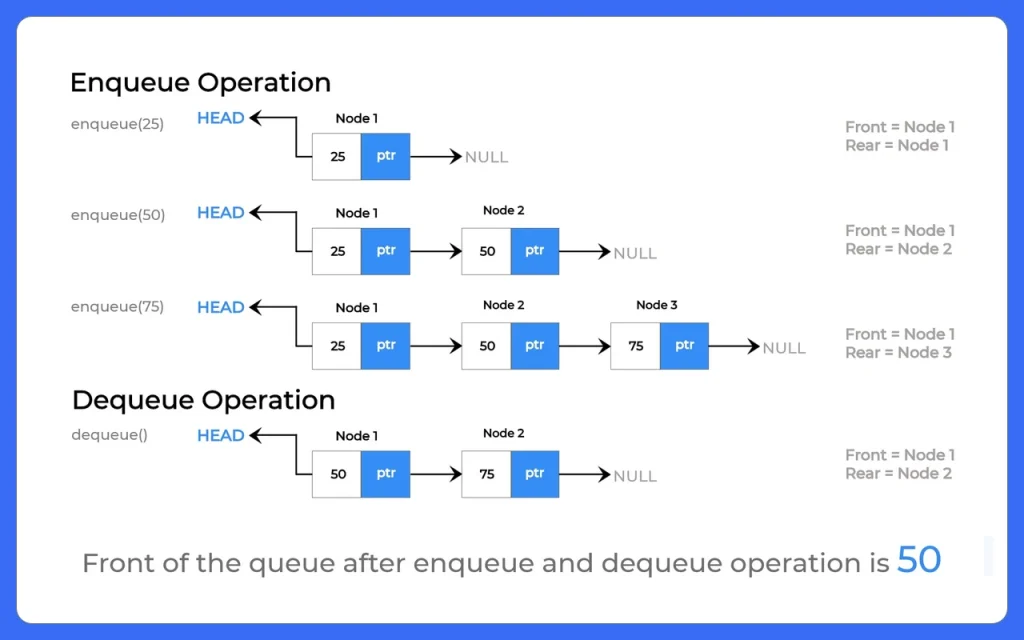
Implementation of Queues using Linked List in Java is a foundational Data Structures topic that bridges abstract concepts with practical code. A queue follows FIFO (First In, First Out) behavior, elements are added at the rear and removed from the front.
Using a linked list removes size restriction (unlike a fixed size array) and ensures dynamic memory usage. This implementation is commonly asked in interviews and used in real systems where unpredictable data size must be handled efficiently.
1. Insertion is done at the rear (Enqueue)
2. Deletion is done from the front (Dequeue)
It follows FIFO order.
Example:
Front → 10 20 30 40 ← Rear
Here, 10 will be removed first.
Basic Operations of Queue using Linked List
- Enqueue: When we want to add an element to the end of the queue
- Dequeue: when we want to Remove an element from the front of the queue
- IsEmpty: Check if the queue is empty
- IsFull: Check if the queue is full
- Peek: Get the value of the front of the queue without removing it
Why Use Linked List for Queue?
Using arrays for queues has some limitations like fixed size and overflow. A linked list overcomes these problems.
Advantages:
- No fixed capacity
- Dynamic memory allocation
- No overflow (until memory is full)
- Fast insertion and deletion (O(1))
When to Use:
- When queue size is not known in advance
- When frequent insertions and deletions are required
- When memory flexibility is needed
| Operation | Description |
|---|---|
| Enqueue | Insert element at rear |
| Dequeue | Remove element from front |
| Peek | View front element |
| isEmpty | Check if queue is empty |
| Display | Print all elements |
Algorithm for Queues using Linked List in Java
Algorithm: Enqueue (Insertion)
- Create a new node with given value
- If rear is null (queue is empty):
- front = rear = newNode
- Else:
- rear.next = newNode
- rear = newNode
Algorithm: Dequeue (Deletion)
- If front is null:
- Queue is empty (Underflow)
- Store front.data
- Move front to front.next
- If front becomes null:
- rear = null
- Return stored value
Algorithm: Peek
- If front is null:
- Queue is empty
- Else:
- Return front.data
Algorithm: isEmpty
- If front == null:
- Return true
- Else:
- Return false


Learn DSA
Prime Course Trailer
Related Banners
Get PrepInsta Prime & get Access to all 200+ courses offered by PrepInsta in One Subscription
Java Code for Implementation of Queues using Linked List
// Node class
class Node {

    int data;
    Node next;

    Node(int data) {
        this.data = data;
        this.next = null;
    }
}

// Queue using Linked List
class LinkedListQueue {

    private Node front;
    private Node rear;

    // Constructor
    public LinkedListQueue() {
        front = rear = null;
    }

    // Enqueue (Insert)
    public void enqueue(int value) {

        Node newNode = new Node(value);

        // If queue is empty
        if (rear == null) {
            front = rear = newNode;
        } else {
            rear.next = newNode;
            rear = newNode;
        }

        System.out.println(value + " inserted into queue");
    }

    // Dequeue (Delete)
    public int dequeue() {

        if (front == null) {
            System.out.println("Queue is empty (Underflow)");
            return -1;
        }

        int removedValue = front.data;
        front = front.next;

        // If queue becomes empty
        if (front == null) {
            rear = null;
        }

        return removedValue;
    }

    // Peek (View front element)
    public int peek() {

        if (front == null) {
            System.out.println("Queue is empty");
            return -1;
        }

        return front.data;
    }

    // Check if queue is empty
    public boolean isEmpty() {
        return front == null;
    }

    // Display queue
    public void display() {

        if (front == null) {
            System.out.println("Queue is empty");
            return;
        }

        Node temp = front;

        System.out.print("Queue: ");
        while (temp != null) {
            System.out.print(temp.data + " ");
            temp = temp.next;
        }

        System.out.println();
    }

    // Main method
    public static void main(String[] args) {

        LinkedListQueue queue = new LinkedListQueue();

        // Enqueue operations
        queue.enqueue(10);
        queue.enqueue(20);
        queue.enqueue(30);

        // Display
        queue.display();

        // Peek
        System.out.println("Front element: " + queue.peek());

        // Dequeue
        System.out.println("Removed: " + queue.dequeue());
        System.out.println("Removed: " + queue.dequeue());

        // Display again
        queue.display();

        // More deletions
        System.out.println("Removed: " + queue.dequeue());
        System.out.println("Removed: " + queue.dequeue()); // Underflow

        // Check empty
        System.out.println("Is queue empty? " + queue.isEmpty());
    }
}
Example Input and Output:
Input:
enqueue(10)
enqueue(20)
enqueue(30)
dequeue()
dequeue()
Output:
10 inserted into queue
20 inserted into queue
30 inserted into queue
Queue: 10 20 30
Front element: 10
Removed: 10
Removed: 20
Queue: 30
Removed: 30
Queue is empty (Underflow)
Is queue empty? true
Time Complexity: O(1)
Space Complexity: O(n)
Space Complexity: O(n)

Frequently Asked Questions
Answer:
It means creating a queue using linked list nodes where front and rear pointers manage insertion and deletion.
Answer:
Enqueue and dequeue both take O(1) time.
Answer:
Linked list provides dynamic size and avoids overflow.
Answer:
Underflow occurs when dequeue is performed on an empty queue.
Answer:
Yes, it is used when queue size is unpredictable and dynamic memory is needed.
Get over 200+ course One Subscription
Courses like AI/ML, Cloud Computing, Ethical Hacking, C, C++, Java, Python, DSA (All Languages), Competitive Coding (All Languages), TCS, Infosys, Wipro, Amazon, DBMS, SQL and others
Stacks
- Introduction to Stack in Data Structure
Click Here - Operations on a Stack
Click Here - Stack: Infix, Prefix and Postfix conversions
Click Here - Stack Representation in –
C | C++ | Java - Representation of a Stack as an Array. –
C | C++ | Java - Representation of a Stack as a Linked List. –
C | C++ | Java - Infix to Postfix Conversion –
C | C++ | Java - Infix to prefix conversion in –
C | C++ | Java - Postfix to Prefix Conversion in –
C | C++ | Java
Queues
- Queues in Data Structures (Introduction)
Click Here - Queues Program in C and implementation
Click Here - Implementation of Queues using Arrays | C Program
Click Here - Types of Queues in Data Structure
Click Here - Application of Queue Data Structure
Click Here - Insertion in Queues Program (Enqueuing) –
C | C++ | Java - Deletion (Removal) in Queues Program(Dequeuing) –
C | C++ | Java - Reverse a Queue –
C | C++ | Java - Queues using Linked Lists –
C | C++ | Java - Implement Queue using Stack –
C | C++ | Java - Implement Queue using two Stacks –
C | C++ | Java
Circular Queues
- Circular queue in Data Structure
Click Here - Applications of Circular Queues
Click Here - Circular queue in –
C | C++ | Java - Circular queue using Array –
C | C++ | Java - Circular Queue using Linked Lists –
C | C++ | Java
Priority Queue
Stacks
- Introduction to Stack in Data Structure
- Operations on a Stack
- Stack: Infix, Prefix and Postfix conversions
- Stack Representation in – C | C++ | Java
- Representation of a Stack as an Array. – C | C++ | Java
- Representation of a Stack as a Linked List. – C | C++ | Java
- Infix to Postfix Conversion – C | C++ | Java
- Infix to prefix conversion in – C | C++ | Java
- Postfix to Prefix Conversion in – C | C++ | Java
Queues
- Queues in Data Structures (Introduction)
- Queues Program in C and implementation
- Implementation of Queues using Arrays | C Program
- Types of Queues in Data Structure
- Application of Queue Data Structure
- Insertion in Queues Program (Enqueuing) – C | C++ | Java
- Deletion (Removal) in Queues Program(Dequeuing) – C | C++ | Java
- Reverse a Queue – C | C++ | Java
- Queues using Linked Lists – C | C++ | Java
- Implement Queue using Stack – C | C++ | Java
- Implement Queue using two Stacks – C | C++ | Java
Circular Queues
- Circular queue in Data Structure
- Applications of Circular Queues
- Circular queue in – C | C++ | Java
- Circular queue using Array – C | C++ | Java
- Circular Queue using Linked Lists – C | C++ | Java


Login/Signup to comment