
Predictive Analysis in Tableau
Predictive Analysis in Tableau
Forecasting and Trend Analysis for Data Analytics
Predictive analysis in Tableau helps analysts identify future trends, forecast business outcomes, and make data driven decisions using historical data. While Tableau is mainly known as a data visualization and business intelligence tool, it also provides useful predictive analytics features such as forecasting, trend lines, clustering, and statistical modeling support.

What is Predictive Analysis in Tableau?
Predictive analysis in Tableau refers to the use of historical data, statistical techniques, and built in analytics features to estimate future outcomes.
In simple terms, it helps answer: “What is likely to happen next?”
Tableau supports predictive analysis through:
- Forecasting
- Trend lines
- Clustering
- Reference lines
- Statistical summaries
- Integration with external tools like Python and R
Predictive analysis does not guarantee exact future results, but it helps analysts identify patterns and make more informed decisions.
Why Predictive Analysis is Important in Data Analytics
Predictive analysis is an important part of modern data analytics because businesses do not only want to know what happened; they also want to understand what may happen next.
Benefits include:
- Better Decision Making: Predictive analysis helps teams make decisions based on data trends instead of assumptions.
- Future Planning: Businesses can forecast sales, demand, revenue, and customer behavior.
- Risk Reduction: Predictive insights help identify possible risks before they become major problems.
- Performance Optimization: Organizations can use predictions to improve operations, marketing, inventory, and financial planning.
- Competitive Advantage: Companies that predict trends early can act faster than competitors.
How Predictive Analysis Works in Tableau
Predictive analysis in Tableau usually follows a simple workflow:
- Connect to historical data
- Clean and prepare the dataset
- Create visualizations
- Identify trends and patterns
- Apply forecasting or trend lines
- Interpret predictive insights
- Use results for business decisions
For example, if a company has monthly sales data from the last three years, Tableau can use that data to estimate future sales trends.

Main Predictive Analysis Features in Tableau
1. Forecasting in Tableau:
Forecasting is one of the most useful predictive analysis features in Tableau. It helps predict future values based on past trends.
Example: If you have monthly sales data, Tableau can forecast future sales for upcoming months.
Use cases:
- Sales forecasting
- Revenue prediction
- Demand planning
- Inventory forecasting
- Website traffic prediction
Tableau forecasting works best when the data has a time based field such as date, month, quarter, or year.
2. Trend Lines in Tableau
Trend lines help show the relationship between variables in a visualization. They are useful when you want to understand whether data is increasing, decreasing, or following a specific pattern.
Example: A scatter plot showing advertising spend vs revenue can use a trend line to show whether higher spending leads to higher revenue.
Common trend line types:
- Linear and Exponential
- Logarithmic and Polynomial
Trend lines are useful in predictive analysis because they help identify patterns that may continue in the future.
3. Clustering in Tableau
Clustering in Tableau helps group similar data points automatically. It is useful for segmentation and pattern detection.
Example: A business can group customers based on buying behavior, sales value, and profit contribution.
Use cases:
- Customer segmentation
- Product grouping
- Market analysis
- Behavioral analysis
Clustering is not forecasting, but it supports predictive analysis by helping analysts identify patterns in data.

4. Reference Lines and Bands
Reference lines and bands help compare actual data against target values, averages, or expected ranges.
Example: A dashboard may show actual sales compared with average sales or expected sales targets.
These features help analysts quickly identify whether performance is above or below expected levels.
5. Statistical Functions in Tableau
Tableau supports several statistical functions that help in data analysis and predictive interpretation.
Examples include:
- Average and Median
- Standard deviation
- Percentiles
- Correlation
- Variance
These functions help analysts understand data behavior before applying predictive techniques.
Forecasting in Tableau: Step by Step
Here is a simple process for creating a forecast in Tableau:
Step 1: Connect Your Data
Connect Tableau to a dataset that contains historical data.
Step 2: Use a Date Field
Forecasting requires a time based field such as month, quarter, or year.
Step 3: Create a Time Series Chart
Drag the date field to Columns and a measure like Sales or Profit to Rows.
Step 4: Add Forecast
Go to the Analytics pane and drag “Forecast” into the view.
Step 5: Analyze the Forecast
Review the forecast line, confidence interval, and expected future values. This makes Tableau forecasting beginner friendly and useful for business users.
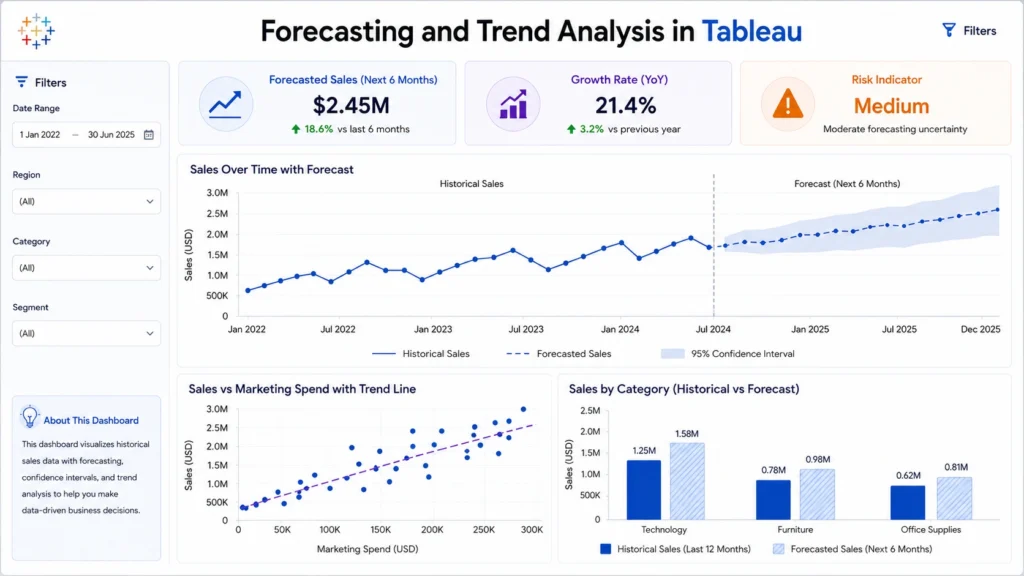
Predictive Analysis Example in Tableau
Imagine a retail company wants to predict future sales.
Dataset includes:
- Order Date
- Sales
- Region
- Product Category
- Profit
Analysis process:
- Create a monthly sales line chart
- Apply Tableau forecasting
- Compare regional sales trends
- Add filters for product categories
- Identify expected sales growth or decline
Business outcome: The company can plan inventory, marketing campaigns, and sales targets more effectively.
Predictive Analysis vs Descriptive Analysis in Tableau
Descriptive analysis explains historical data, while predictive analysis uses historical data to estimate future outcomes.
| Feature | Descriptive Analysis | Predictive Analysis |
|---|---|---|
| Main Question | What happened? | What may happen next? |
| Focus | Past data | Future trends |
| Tools | Charts, dashboards, summaries | Forecasts, trend lines, clustering |
| Example | Last month’s sales report | Next month’s sales forecast |
When to Use Predictive Analysis in Tableau
Predictive analysis in Tableau is useful when:
- You have historical data
- You want to forecast future trends
- You need to identify growth or decline patterns
- You want to support business planning
- You need to compare actual performance with expected results
It is especially useful for sales, finance, marketing, operations, and customer analytics.
Limitations of Predictive Analysis in Tableau
Predictive analysis is powerful, but it has limitations. Main limitations include:
- Predictions depend on data quality: Poor quality data leads to unreliable forecasts.
- Forecasts are not guaranteed: They estimate possibilities, not fixed outcomes.
- External factors may affect results: Market changes, economic conditions, or sudden events can change trends.
- Complex models may need Python or R: For advanced machine learning models, Tableau may need integration with external tools.
So, predictive analysis should be used as a decision support method, not as a final absolute answer.
Real World Applications of Predictive Analysis in Tableau
Conclusion….
Predictive analysis in Tableau is a valuable skill for anyone working in data analytics because it helps move beyond past reporting and supports future focused decision making. Features like forecasting, trend lines, clustering, and statistical analysis allow users to identify patterns, estimate future outcomes, and create more insightful dashboards.
When used correctly, predictive analysis helps businesses plan better, reduce risks, and make smarter decisions based on data. However, the accuracy of predictions depends heavily on clean data, correct interpretation, and proper business context.
Frequently Asked Questions
Answer:
Predictive analysis in Tableau is the process of using historical data, forecasting, trend lines, and statistical features to estimate future outcomes and identify patterns.
Answer:
Yes, Tableau supports predictive analytics through forecasting, trend lines, clustering, statistical functions, and integrations with Python or R for advanced modeling.
Answer:
Forecasting in Tableau predicts future values based on historical time-series data. It is commonly used for sales, revenue, demand, and performance prediction.
Answer:
Forecasting predicts future values over time, while trend lines show relationships or patterns between variables in the existing data.
Answer:
Yes, Tableau makes predictive analysis easier for beginners because features like forecasting and trend lines can be applied visually without writing complex code.
Answer:
It is used in sales forecasting, financial planning, marketing analysis, customer behavior prediction, demand forecasting, and performance monitoring.

