
Dashboard Design in Data Analytics
How to Build Clear Business Dashboards
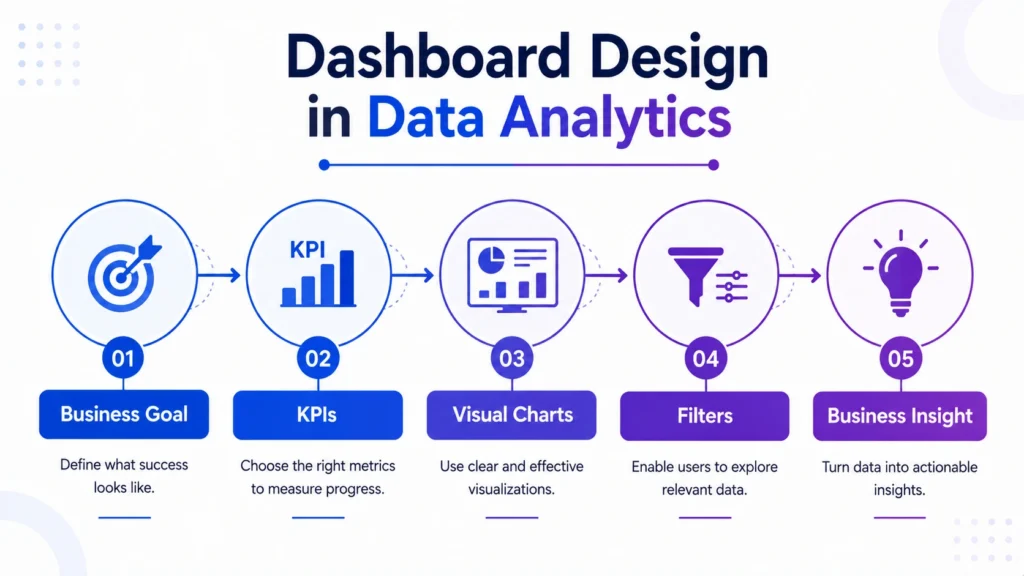
Dashboard design in data analytics is the process of creating clear, useful, and visually organized dashboards that help users understand data quickly. A dashboard is not just a collection of charts. It is a decision making screen that should answer business questions clearly.
This topic is closely connected with Tableau because Tableau is widely used for creating interactive dashboards, visual reports, and data stories. Tableau’s own dashboard best practice guidance recommends keeping dashboards focused and limiting the number of views so the main message does not get lost.

What is Dashboard Design in Data Analytics?
Dashboard design means arranging KPIs, charts, filters, tables, and insights in a way that makes data easy to understand.
A good dashboard should answer questions like:
- What is happening?
- Which metric needs attention?
- What changed over time?
- Which category or region is performing better?
- What action should the business take?
In simple words, dashboard design helps turn raw data into a clear visual decision making tool.
Why Dashboard Design Matters
A poorly designed dashboard can confuse users even if the data is correct. Too many charts, unclear labels, wrong colors, and unnecessary details can make insights difficult to understand.
A good dashboard helps users:
- Track KPIs quickly
- Compare performance
- Find trends and outliers
- Understand business issues
- Make faster decisions
Tableau’s visual best practice guidance also highlights that dashboards should follow a logical layout, use simplified design, and make interactive elements discoverable and predictable.
Main Elements of a Good Dashboard
1. Clear Business Goal
Every dashboard should start with a clear purpose.
Example:
- Sales performance dashboard
- Marketing campaign dashboard
- Customer churn dashboard
- Financial performance dashboard
- HR analytics dashboard
Without a clear goal, the dashboard may become visually attractive but practically weak.
2. Relevant KPIs
KPIs should be placed where users can see them quickly, usually at the top.
Common KPIs include:
- Revenue
- Profit
- Conversion rate
- Customer count
- Sales growth
- Cost
- Retention rate
KPIs help users understand the overall performance before looking at detailed charts.
3. Right Chart Selection
Choosing the right chart is very important. A chart should make the insight easier, not more complicated.
| Business Question | Best Visual |
|---|---|
| Trend over time | Line chart |
| Category comparison | Bar chart |
| Share of total | Pie chart or Donut chart |
| Performance summary | KPI card |
| Distribution | Histogram or Box Plot |
| Relationship | Scatter plot |
| Location-based data | Map |
4. Clean Layout
A dashboard should follow a natural reading flow. In most cases, users read from top to bottom and left to right.
A good layout usually includes:
- Top: Main KPIs
- Middle: Main charts
- Bottom: Detailed breakdowns
- Side or top filters: User controls
This structure helps users move from summary to detail smoothly.
5. Proper Use of Colors
Colors should highlight important information, not decorate the dashboard unnecessarily.
Best practices:
- Use limited colors
- Use one color for positive performance
- Use another for negative performance
- Avoid too many bright colors
- Keep color meaning consistent
For example, if red means loss in one chart, it should not mean profit in another chart.
Dashboard Design Best Practices
1. Keep It Simple
Do not add too many charts. A dashboard should show the most useful information first.
Tableau recommends limiting dashboard views because too many views can reduce clarity and hide the bigger picture.
2. Know the Audience
A dashboard for executives should focus on high level KPIs. A dashboard for analysts can include deeper filters, trends, and drill downs.
Before designing, ask:
- Who will use this dashboard?
- What decision will they make?
- How much detail do they need?
Microsoft’s Power BI dashboard design guidance also emphasizes considering the audience and telling a story on one screen.
3. Use Filters Carefully
Filters help users explore data, but too many filters can confuse them.
Useful filters include:
- Date
- Region
- Product category
- Customer segment
- Department
Only include filters that support the dashboard goal.
4. Use Clear Titles and Labels
Every chart should have a meaningful title.
Instead of:
“Sales Chart”
Use:
“Monthly Sales Trend by Region”
Clear titles help users understand the chart without extra explanation.
5. Highlight Key Insights
Use callouts, annotations, or small text notes to explain important changes.
Example:
“Profit dropped in Q3 due to higher discounts in the Electronics category.”
This makes the dashboard more useful for business users.

Dashboard Design in Tableau
Tableau is especially useful for dashboard design because it allows users to create interactive visuals, filters, calculated fields, parameters, and dashboard actions.
In Tableau dashboard design, learners should focus on:
- Dimensions and measures
- Filters and parameters
- Dashboard actions
- Calculated fields
- Clean layouts
- Data storytelling
- Interactive visual exploration
A good Tableau dashboard should not only look professional but also guide users toward the right insight.
Common Mistakes in Dashboard Design
Beginners often make these mistakes:
- Adding too many charts
- Using wrong chart types
- Ignoring dashboard purpose
- Using too many colors
- Not adding proper labels
- Making filters confusing
- Showing data without insights
- Designing for themselves instead of the audience
A dashboard should be created for the user, not just for the designer.
Dashboard design is an important skill for data analysts because real world analytics is not only about finding insights but also presenting them clearly.
Career247’s Data Analytics with GenAI Course covers Tableau, dashboards, Excel, SQL, Python, statistics, real world projects, and data storytelling so learners can build practical, job ready analytics skills.
Dashboard design in data analytics is a key skill for turning data into clear business insights. A good dashboard should not be overloaded with charts. It should answer important business questions, highlight key KPIs, and guide users toward action.
For Tableau learners, dashboard design is especially important because Tableau is built for interactive visual analytics and data storytelling. If you can build clean, focused, and business friendly dashboards, your analysis becomes more useful and decision ready.

Frequently Asked Questions
Answer:
Dashboard design in data analytics is the process of arranging KPIs, charts, filters, and insights in a clear visual format to support business decisions.
Answer:
Dashboard design is important because it helps users understand data quickly, track performance, and make better decisions.
Answer:
A good dashboard has a clear goal, relevant KPIs, simple charts, clean layout, useful filters, and clear business insights.
Answer:
Yes, Tableau is widely used for dashboard design because it supports interactive charts, filters, calculated fields, parameters, and dashboard storytelling.
Answer:
It depends on the question. Line charts are good for trends, bar charts for comparisons, KPI cards for summaries, and scatter plots for relationships.

