
Essential SQL Skills for Data Analytics
Essential SQL Skills for Data Analytics
SQL (Structured Query Language) is one of the most important skills for anyone pursuing a career in data analytics. Data analysts use SQL to collect, organize, filter, and analyze data stored in databases. Since most organizations store their business information in relational databases, SQL has become a fundamental tool for transforming raw data into meaningful insights.
Whether you are a beginner or an experienced professional, mastering SQL can significantly improve your ability to work with large datasets and make data-driven decisions.

Why SQL is Important for Data Analytics
SQL (Structured Query Language) is one of the most essential skills for data analysts because it allows them to interact directly with databases where business data is stored. Organizations generate massive amounts of data every day, including customer information, sales records, website activity, financial transactions, and operational data. SQL helps analysts access this information quickly and transform raw data into meaningful insights.
Data analysts spend a significant portion of their workday querying databases to extract relevant information for reporting and decision-making. Unlike spreadsheets, SQL can efficiently handle millions of records, making it the preferred tool for managing and analyzing large datasets. Whether an analyst is identifying sales trends, tracking customer behavior, measuring business performance, or preparing dashboards, SQL plays a critical role in the entire analytics process.
SQL is also widely used across industries such as finance, healthcare, retail, marketing, e-commerce, and technology. Because of its versatility and ease of use, it remains one of the most in-demand technical skills for data analytics professionals.
Benefits of SQL in Data Analytics
- Quickly Retrieve Large Amounts of Data
SQL enables analysts to access specific information from massive databases within seconds, saving time and improving productivity. - Filter and Sort Information Efficiently
Using commands such as WHERE, ORDER BY, and LIMIT, analysts can organize data and focus only on relevant records. - Combine Data from Multiple Tables
SQL joins allow users to connect related datasets, helping businesses gain a complete view of customers, products, and operations. - Perform Calculations and Aggregations
Functions like SUM(), COUNT(), AVG(), MIN(), and MAX() make it easy to calculate important business metrics and KPIs. - Generate Reports for Business Decision-Making
SQL helps create accurate reports that support strategic planning, performance monitoring, and operational improvements. - Support Data Visualization and Dashboard Creation
Many business intelligence tools such as Power BI, Tableau, and Looker Studio rely on SQL queries to fetch and display data in dashboards. - Improve Data Accuracy and Consistency
SQL allows analysts to work directly with centralized databases, reducing the risk of errors that often occur when handling data manually. - Enable Advanced Data Analysis
Analysts can use SQL to identify trends, detect anomalies, segment customers, and uncover patterns that drive business growth.
SQL as a Career Skill
Employers consistently list SQL as a required or preferred skill in data analytics job postings. From entry-level data analyst roles to senior business intelligence positions, SQL proficiency is often considered a fundamental requirement. Learning SQL not only improves an analyst’s ability to work with data but also increases career opportunities and earning potential.
As businesses continue to rely on data-driven decision-making, SQL remains one of the most valuable and widely used tools in the field of data analytics. Mastering SQL provides a strong foundation for learning advanced analytics, data visualization, data engineering, and data science techniques.
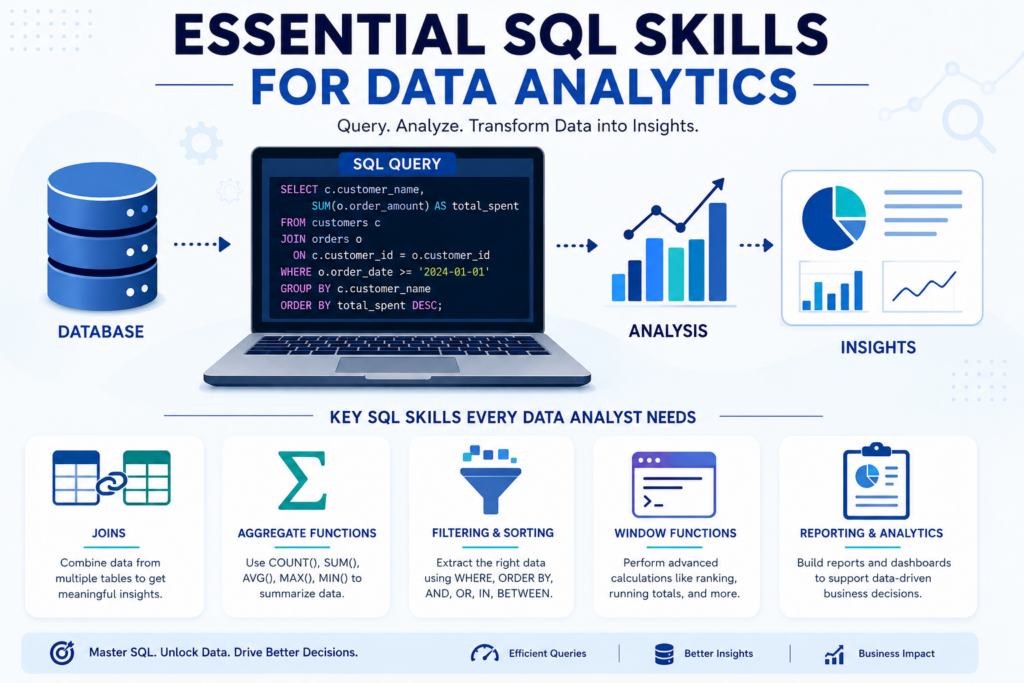
- Database querying
- Data extraction
- Data cleaning
- Table joins
- Aggregation functions

Understanding Database Fundamentals
Before learning advanced SQL techniques, analysts should understand basic database concepts.
Key Database Concepts
- Tables
- Rows and Columns
- Primary Keys
- Foreign Keys
- Relationships
- Data Types
- Database Schemas
Understanding these concepts helps analysts work effectively with structured data and build accurate queries.
Basic SQL Query Skills
The first step in SQL is learning how to retrieve information from a database.
Common SQL Commands
SELECT
Used to retrieve data from a table.
SELECT * FROM customers;
WHERE
Filters records based on specific conditions.
SELECT * FROM customers
WHERE country = 'India';
ORDER BY
Sorts data in ascending or descending order.
SELECT * FROM customers
ORDER BY sales DESC;
LIMIT
Restricts the number of records returned.
SELECT * FROM customers
LIMIT 10;
These commands form the foundation of most SQL queries used in data analytics.
Data Filtering and Sorting
Data analysts often need to find specific records from large datasets.
Essential Filtering Techniques
- WHERE clause
- AND condition
- OR condition
- NOT operator
- BETWEEN statement
- IN operator
- LIKE operator
Example:
SELECT * FROM orders
WHERE order_amount > 5000
AND city = 'Delhi';
Proper filtering helps analysts focus on relevant business information.
Aggregate Functions for Data Analysis
Aggregate functions summarize large datasets into meaningful insights.
Common Aggregate Functions
- COUNT()
- SUM()
- AVG()
- MAX()
- MIN()
Example:
SELECT AVG(sales)
FROM monthly_sales;
These functions are frequently used for performance analysis and reporting.
Grouping Data with GROUP BY
Grouping data allows analysts to calculate metrics for different categories. Example:SELECT region, SUM(revenue) FROM sales GROUP BY region;
Uses of GROUP BY
- Sales analysis by region
- Revenue by product category
- Customer segmentation
- Department performance tracking
Types of SQL Joins
- INNER JOIN
Returns matching records from both tables.
- LEFT JOIN
Returns all records from the left table and matching records from the right table.
- RIGHT JOIN
Returns all records from the right table and matching records from the left table.
- FULL JOIN
Returns all records from both tables.
Example:SELECT customers.name, orders.order_id FROM customers INNER JOIN orders ON customers.customer_id = orders.customer_id;Joins are among the most valuable SQL skills for data analytics professionals.
Using SQL Functions
SQL functions help manipulate and transform data. Popular SQL Functions- String Functions
- CONCAT()
- UPPER()
- LOWER()
- LENGTH()
- Date Functions
- CURRENT_DATE
- DATEADD
- DATEDIFF
- Numeric Functions
- ROUND()
- ABS()
- CEILING()
SELECT employee_name
FROM employees
WHERE salary >
(
SELECT AVG(salary)
FROM employees
);
Benefits of Subqueries
- Simplify complex analysis
- Improve data filtering
- Enable advanced reporting
- Support decision-making processes
Window Functions for Advanced Analytics
Window functions perform calculations across a set of rows without grouping the data. Common Window Functions- ROW_NUMBER()
- RANK()
- DENSE_RANK()
- LEAD()
- LAG()
SELECT employee_name,
salary,
RANK() OVER (ORDER BY salary DESC)
FROM employees;
Window functions are widely used in advanced data analytics and reporting.
- SQL has been used for database management since the 1970s.
- More than 90% of business databases rely on SQL-based systems.
- SQL is considered one of the top technical skills for data analysts.
- Most BI tools like Tableau and Power BI integrate directly with SQL databases.
Data Cleaning with SQL
Data cleaning is one of the most important steps in the data analytics process. No matter how advanced the analysis techniques are, inaccurate or incomplete data can lead to misleading results and poor business decisions. SQL provides powerful tools that help analysts identify, correct, and manage data quality issues directly within databases.
Organizations collect data from multiple sources such as websites, mobile applications, CRM systems, surveys, and transactional platforms. During data collection, errors such as duplicate records, missing values, incorrect formatting, and inconsistent entries often occur. Before performing any meaningful analysis, analysts must clean and prepare the data to ensure accuracy and reliability.
SQL allows data professionals to efficiently clean large datasets by filtering, updating, validating, and transforming data. Since most business data is stored in relational databases, SQL has become one of the primary tools for data cleaning and preparation. A well-cleaned dataset improves reporting accuracy, supports better decision making, and helps organizations gain trustworthy insights.
Why Data Cleaning is Important
Poor-quality data can negatively affect business operations and analytics outcomes. For example, duplicate customer records may inflate customer counts, missing sales values can distort revenue calculations, and inconsistent product names can create reporting errors.
Effective data cleaning helps organizations:
- Improve data accuracy and reliability
- Reduce reporting errors
- Enhance business intelligence and analytics
- Increase confidence in decision-making
- Save time during data analysis
- Improve dashboard and visualization quality
- Maintain consistency across databases
Common Data Cleaning Tasks in SQL
1. Removing Duplicate Records
Duplicate records occur when the same information is entered multiple times into a database. These duplicates can lead to inaccurate calculations and misleading reports.
SQL helps identify and remove duplicate rows using techniques such as:
- DISTINCT statements
- GROUP BY queries
- ROW_NUMBER() functions
- Common Table Expressions (CTEs)
Removing duplicate data ensures that reports and analytics reflect the actual number of customers, transactions, or products.
2. Handling Missing Values
Missing values are one of the most common data quality issues. Incomplete information can affect calculations, machine learning models, and business reports.
SQL provides several methods for managing missing values:
- Replacing NULL values with default values
- Updating missing records when information becomes available
- Filtering incomplete records from analysis
- Using functions such as COALESCE() and ISNULL()
Proper handling of missing data helps maintain consistency and prevents inaccurate results.
3. Standardizing Text Formats
Data entered by different users often contains formatting inconsistencies. For example, a city name might appear as:
- Delhi
- DELHI
- delhi
- New Delhi
These variations can create duplicate categories and inaccurate reports.
SQL functions help standardize text by:
- Converting text to uppercase or lowercase
- Removing unnecessary spaces
- Formatting names consistently
- Cleaning special characters
Standardized data improves reporting accuracy and simplifies data analysis.
4. Correcting Inconsistent Entries
Inconsistent data occurs when the same information is recorded in multiple formats. For example:
- Male, M, and male
- USA, U.S.A., and United States
- January, Jan, and JAN
SQL update statements and conditional logic can be used to convert these variations into a single standardized format. This process ensures consistency across datasets and improves the reliability of analytical results.
5. Validating Data Accuracy
Data validation helps ensure that stored information meets predefined business rules and quality standards.
Examples of validation checks include:
- Verifying email address formats
- Checking valid date ranges
- Identifying negative sales amounts
- Detecting unrealistic age values
- Confirming required fields are populated
SQL queries can quickly identify records that violate these rules, allowing analysts to correct errors before analysis begins.
Conclusion
SQL is one of the most essential technical skills for data analytics because it enables professionals to access, organize, and analyze large datasets efficiently. From basic queries and filtering to advanced joins and window functions, SQL provides the foundation for data-driven decision-making. By mastering these essential SQL skills, aspiring data analysts can improve their career prospects and deliver valuable business insights with confidence.
Frequently Asked Questions
Answer:
SQL is the primary language used to access and manage data stored in databases. It helps analysts retrieve, filter, and organize large datasets efficiently. With SQL, businesses can generate reports, identify trends, and make data-driven decisions. It is considered one of the most essential skills for data analytics professionals.
Answer:
Every data analyst should understand SELECT statements, filtering with WHERE, sorting using ORDER BY, grouping data with GROUP BY, and combining tables with JOINs. Learning aggregate functions such as COUNT(), SUM(), and AVG() is also important. These skills form the foundation of data analysis and reporting.
Answer:
SQL joins allow analysts to combine data from multiple tables into a single result set. This makes it easier to analyze relationships between customers, products, sales, and other business data. Joins help create comprehensive reports and uncover deeper insights from connected datasets.
Answer:
Window functions perform calculations across a set of rows without grouping the data. They are commonly used for ranking, running totals, moving averages, and trend analysis. Functions like ROW_NUMBER(), RANK(), and LAG() are especially useful in advanced analytics projects.
Answer:
Beginners can improve their SQL skills by practicing queries regularly and working with real-world datasets. Building small analytics projects and solving SQL challenges can strengthen understanding. Consistent practice with joins, aggregations, and reporting queries helps develop confidence and expertise.

