
SQL Window Functions for Data Analytics
SQL Window Functions for Data Analytics
If there is one SQL topic that consistently separates junior analysts from senior ones, it is sql window functions for data analytics. Window functions allow analysts to perform calculations across a set of rows related to the current row without collapsing the result into a single summarized row, the way a GROUP BY does. This makes them essential for running totals, rankings, period-over-period comparisons, and cohort analysis, all of which are everyday tasks in modern analytics teams.
This article walks through what window functions are, why they matter, the most important functions to know, and how they are actually used in real analytics workflows.

What Are SQL Window Functions?
A window function performs a calculation across a “window” of rows that are related to the current row, defined using the OVER() clause. Unlike aggregate functions used with GROUP BY, window functions do not reduce the number of rows returned. This means you can see both the individual row-level detail and a calculated aggregate side by side.
The basic syntax looks like this:
SELECT
column_a,
SUM(sales) OVER (PARTITION BY region ORDER BY sale_date) AS running_total
FROM sales_table;
This is the core reason sql window functions for data analytics are so powerful: they let analysts blend granular and aggregated views in a single query, cutting down on the need for self-joins or multiple subqueries.
Why Window Functions Matter in Data Analytics
- They eliminate the need for complex self-joins that used to be required for running totals and rankings.
- They make queries more readable and maintainable compared to nested subqueries.
- They are essential for time-series analysis, such as month-over-month or year-over-year growth calculations.
- They are heavily tested in data analyst and data scientist technical interviews.
- They power many of the calculations behind BI dashboards, from leaderboard rankings to retention curves.
Any analyst serious about advancing their SQL skills needs fluency in sql window functions for data analytics, because they show up constantly in real business questions like “what is each customer’s rank by spend” or “what is the 7-day rolling average of daily orders.”
The Three Core Components of a Window Function
Every window function is built from three parts:
- The function itself – e.g., SUM(), RANK(), LAG().
- PARTITION BY – defines the groups within which the calculation resets, similar to a GROUP BY but without collapsing rows.
- ORDER BY – defines the order in which rows are processed within each partition, critical for running totals, rankings, and lag/lead calculations.
Understanding these three components makes almost every window function easy to read, even complex ones.
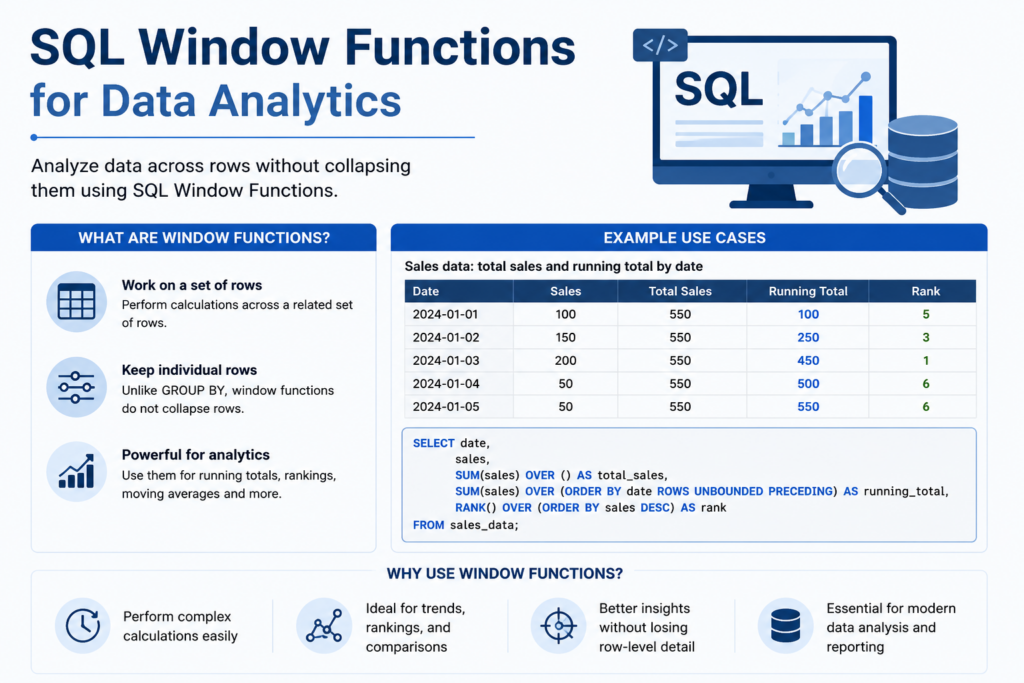
Must-Know SQL Window Functions for Data Analytics
1. Ranking Functions
- ROW_NUMBER() – Assigns a unique, sequential number to each row within a partition, even if values are tied.
- RANK() – Assigns a rank, but skips numbers after ties (1, 2, 2, 4).
- DENSE_RANK() – Similar to RANK, but does not skip numbers after ties (1, 2, 2, 3).
- NTILE(n) – Splits rows into a specified number of roughly equal buckets, commonly used for building quartiles or deciles.
Example use case: Ranking customers by total spend within each region to identify top performers.
2. Aggregate Window Functions
- SUM() OVER() – Calculates running totals or grand totals without collapsing rows.
- AVG() OVER() – Calculates moving averages, essential for smoothing noisy daily data.
- COUNT() OVER() – Counts rows within a partition, useful for identifying group sizes without a separate query.
- MIN()/MAX() OVER() – Finds the smallest or largest value within a partition while retaining row-level detail.
3. Value Functions (Offset Functions)
- LAG() – Retrieves a value from a previous row, critical for period-over-period comparisons like “sales this month vs last month.”
- LEAD() – Retrieves a value from a following row, useful for forecasting comparisons or churn analysis.
- FIRST_VALUE() – Returns the first value in an ordered partition, often used to compare current performance to a baseline.
- LAST_VALUE() – Returns the last value in an ordered partition, though it requires careful frame specification to behave as expected.


Real-World Applications of SQL Window Functions in Data Analytics
- Running totals – Calculating cumulative revenue over time for finance reporting.
- Cohort retention analysis – Tracking how a group of users behaves over successive time periods.
- Customer ranking – Identifying top spenders, most active users, or highest churn-risk accounts.
- Period-over-period growth – Using LAG() to calculate percentage change from the previous period.
- Deduplication – Using ROW_NUMBER() with PARTITION BY to identify and remove duplicate records, a very common data-cleaning task.
- Rolling averages – Smoothing volatile daily metrics like website traffic or transaction volume using a defined frame.
Window Frames The Detail Most Analysts Miss
Many analysts learn the basic functions but skip understanding the frame clause, which defines exactly which rows are included in the window relative to the current row.
- ROWS BETWEEN UNBOUNDED PRECEDING AND CURRENT ROW – Includes everything from the start of the partition up to the current row, used for running totals.
- ROWS BETWEEN 6 PRECEDING AND CURRENT ROW – Includes the current row and the six before it, commonly used for 7-day rolling metrics.
- RANGE BETWEEN – Similar to ROWS, but based on the value in the ORDER BY column rather than physical row position, useful when there are ties or gaps in dates.
Without understanding frames, functions like LAST_VALUE() often return unexpected results, which is one of the most common debugging headaches analysts encounter when first learning sql window functions for data analytics.
Window Functions vs GROUP BY Key Differences
- GROUP BY collapses rows into one row per group; window functions keep all original rows.
- GROUP BY cannot easily calculate running totals or rankings without complex subqueries; window functions handle this natively.
- Window functions can be combined with GROUP BY in the same query for advanced multi-level aggregations.
- Performance-wise, window functions are often more efficient than the equivalent self-join, especially on large tables.
Common Mistakes When Using SQL Window Functions
- Forgetting the ORDER BY clause when it’s required for functions like LAG, LEAD, and running totals, which can cause inconsistent results.
- Misunderstanding the default frame for aggregate functions when ORDER BY is present, which can silently turn a total into a running total.
- Nesting window functions directly inside another window function, which is not allowed in standard SQL — a subquery or CTE is required instead.
- Using RANK() when DENSE_RANK() or ROW_NUMBER() is actually the correct choice for the business question being asked.
Performance Considerations for Window Functions on Large Datasets
As datasets scale into millions or billions of rows, how you write sql window functions for data analytics starts to materially affect query performance.
- Indexing the PARTITION BY and ORDER BY columns can dramatically reduce the sorting work the database engine has to perform for each window calculation.
- Limiting the frame size (for example, using a fixed 7-row window instead of an unbounded one) reduces the amount of data the engine scans for each row.
- Filtering before windowing — applying WHERE clauses to shrink the dataset before window functions run — avoids wasted computation on rows that will be discarded anyway.
- Materializing intermediate results with CTEs can make complex, multi-step window function queries easier for the query optimizer to plan efficiently, and easier for analysts to debug.
- Avoiding unnecessary DISTINCT after windowing — since window functions preserve row counts, an extra DISTINCT often signals a logic issue rather than a genuine need for deduplication.
Most modern cloud data warehouses (BigQuery, Snowflake, Redshift) are heavily optimized for window functions, but query design still matters, especially on tables with billions of rows.
Learning Path Getting Comfortable with SQL Window Functions
For analysts building this skill from scratch, a structured learning path helps avoid the common trap of memorizing syntax without understanding when to apply it.
- Start with ROW_NUMBER() and simple PARTITION BY logic on a small practice table, since it’s the easiest function to visualize.
- Move on to SUM() and AVG() with OVER() to build running totals and moving averages.
- Practice LAG() and LEAD() using a dataset with clear time-series structure, such as daily sales or website traffic.
- Study the frame clause explicitly, since it’s the concept most tutorials skip but interviewers frequently probe.
- Solve realistic business questions end-to-end — for example, “find the second-highest order for each customer” — rather than isolated syntax drills.
- Review query execution plans to understand how the database actually processes your window function, which builds intuition for performance optimization over time.
This progression mirrors how sql window functions for data analytics are actually used on the job: starting with simple ranking and moving toward more advanced time-series and performance-sensitive queries.
Documenting Window Function Logic for Team Knowledge Sharing
When documenting sql window functions for data analytics internally in a data dictionary, a wiki, or a shared query library writing clear, self-contained explanations of each function’s purpose pays off in two ways: it helps new team members ramp up faster, and it creates a searchable knowledge base that saves the whole team from re-solving the same problem repeatedly.
- Document the business question each saved query answers, not just the raw SQL, so future users understand when to reuse it.
- Note any assumptions baked into the frame clause, since these are the easiest part of a query to misread later.
- Include a small sample output alongside each documented query, making it faster to confirm the logic still behaves as expected after a schema change.
- Tag queries by use case — ranking, running totals, cohort analysis — so teammates can find a relevant pattern quickly instead of writing one from scratch.
Putting It Together: A Realistic Window Function Query
Consider a subscription business that wants to know, for each customer, their current monthly spend, how it compares to their spend last month, and their rank among all customers in their plan tier. A single query using sql window functions for data analytics might combine:
- LAG() partitioned by customer and ordered by month, to pull last month’s spend alongside the current row.
- A calculated percentage-change column, derived directly from the current and lagged values, to show growth or decline at a glance.
- RANK() partitioned by plan tier and ordered by current spend descending, to show each customer’s standing among peers on the same plan.
- SUM() OVER() with an unbounded preceding frame, partitioned by customer, to show lifetime spend running alongside the monthly detail.
Writing this as a single query with window functions avoids what would otherwise require multiple self-joins and temporary tables, and it keeps every calculation transparent and auditable in one place. This is precisely why sql window functions for data analytics have become a default expectation rather than a specialized skill — nearly every recurring business report involves some combination of ranking, running totals, or period comparisons, and window functions handle all three cleanly within standard SQL.
Key Takeaways
- SQL window functions for data analytics let you calculate aggregates without losing row-level detail.
- Ranking, aggregate, and offset (LAG/LEAD) functions form the essential toolkit for most business questions.
- The frame clause is often overlooked but critical for accurate running totals and rolling averages.
- Window functions frequently replace complex self-joins and nested subqueries, improving both readability and performance.
- Mastery of window functions is one of the most reliable predictors of SQL interview success for data analyst roles.
Frequently Asked Questions
Answer:
RANK() skips numbers after a tie, while DENSE_RANK() does not. For example, with two rows tied for first place, RANK() gives 1, 1, 3, while DENSE_RANK() gives 1, 1, 2.
Answer:
They test a candidate’s ability to solve real business problems like running totals, rankings, and period comparisons using efficient, readable SQL rather than complex joins.
Answer:
Yes. Window functions are typically applied after GROUP BY logic is resolved, allowing analysts to layer row-level calculations on top of grouped aggregates.
Answer:
ROW_NUMBER() for deduplication and ranking, along with SUM() and AVG() with OVER() clauses for running totals and moving averages, are the most frequently used in day-to-day analytics work.
Answer:
The core syntax is standardized across PostgreSQL, SQL Server, Snowflake, BigQuery, and MySQL 8+, though some engines offer additional convenience functions or slightly different default frame behavior worth checking in the documentation.