
Growing Importance of Self Service Analytics
The Growing Importance of Self Service Analytics in Modern Organizations
A decade ago, business intelligence was largely a back-office function. A small team of specialists built reports, and everyone else waited their turn. That model simply doesn’t hold up anymore. Modern organizations move too fast, and decisions need to happen too quickly, for reporting to remain centralized in the hands of a few people. This is exactly why self service business intelligence has moved from a nice extra to a core operational requirement.
This article explores why this shift has happened, what self service business intelligence looks like in a modern workplace, and how organizations can use it effectively without losing control over their data.

Defining Self Service Business Intelligence
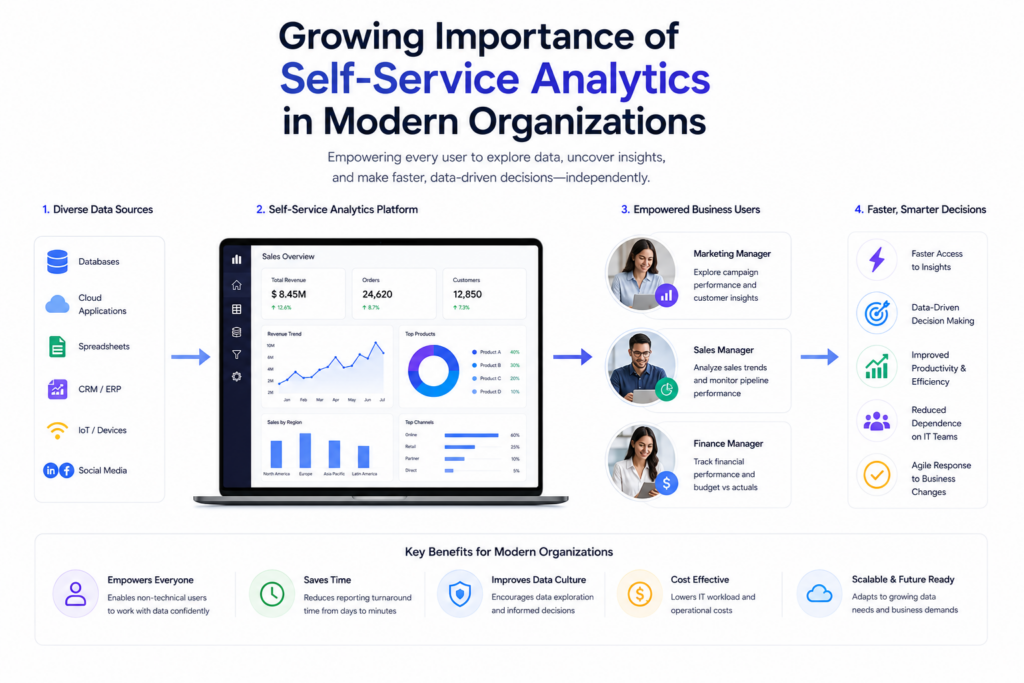
Self service business intelligence refers to tools and platforms that let non-technical employees access, visualize, and interpret data without depending on a dedicated BI or IT team for every request. It typically includes intuitive dashboards, drag-and-drop report builders, and increasingly, natural language search that lets someone simply type a question and get a relevant answer.
The defining feature isn’t just ease of use, it’s independence. Employees across departments can explore data on their own terms, at the moment they actually need the information, rather than submitting a request and waiting for someone else’s availability.
Why This Shift Is Happening Now
A few converging factors explain why self service business intelligence has become essential rather than optional:
- Decision cycles have compressed. Markets move faster, customer expectations change quickly, and waiting days for a report often means missing a window to act.
- Data sources have multiplied. Businesses now pull data from CRMs, marketing platforms, finance systems, and operational tools, far more than a small centralized team can manually track and report on.
- Remote and hybrid work increased demand for accessible tools. When teams are distributed, waiting on a colleague to “just pull a report” becomes far less practical.
- Competitive pressure rewards speed. Companies that can act on fresh data immediately tend to outperform those still working from last month’s spreadsheet.
- Employee expectations have changed. Many workers are now used to intuitive consumer apps in their personal lives and expect similarly accessible tools at work.
Put simply, the businesses that adapted to self-serve data access early are the ones now operating with a real competitive edge in speed and responsiveness.
Core Benefits for Modern Organizations
The advantages tend to fall into a few clear categories:
- Faster decision making – Teams get answers in minutes rather than days, allowing quicker pivots in strategy.
- Reduced bottlenecks on technical teams – IT and analytics specialists spend less time on repetitive requests and more time on complex, high-value projects.
- Greater data literacy across the organization – As more employees interact directly with data, overall comfort and understanding of metrics tends to improve company-wide.
- Better cross-department alignment – When everyone can access the same dashboards, conversations are grounded in shared numbers instead of conflicting reports built independently.
- Cost efficiency – Reducing the need for a large centralized reporting team can meaningfully cut operational overhead over time.
Where Self Service Business Intelligence Adds the Most Value
Some functions benefit more visibly than others:
- Sales operations rely on real-time pipeline visibility to forecast accurately and adjust targets mid-quarter.
- Marketing teams use it to measure channel performance without waiting on a dedicated analyst for every campaign review.
- Customer support leaders track ticket volume and resolution times to staff appropriately and spot recurring issues early.
- Product teams monitor usage patterns directly, shaping roadmap decisions based on actual behavior rather than assumptions.
- Executives get a consolidated, real-time view of company performance without waiting for monthly reporting cycles.
Common Misconceptions About Self Service Business Intelligence
A few myths tend to slow adoption unnecessarily:
- “It removes the need for data governance.” In reality, governance becomes even more important, since more people are interacting with the data directly.
- “Only large enterprises can benefit from it.” Many affordable platforms now serve small and mid-sized businesses just as effectively.
- “Employees will misinterpret data without expert oversight.” With proper training and clear metric definitions, most employees handle self-serve tools responsibly and accurately.
- “It’s a one-time software purchase, not an ongoing process.” Successful adoption requires continuous refinement, training, and feedback, not a single rollout.
Building a Strong Self Service Business Intelligence Strategy
Organizations that succeed with this approach tend to follow a similar set of principles:
- Start with clean, well-organized data before introducing self-serve tools, since messy data undermines trust in every dashboard built from it.
- Define key metrics consistently across departments so two teams never report different numbers for the same thing.
Choose a platform that matches the technical comfort level of your actual user base, not just the most feature-rich option available. - Provide ongoing training rather than a single onboarding session, since tools and use cases evolve over time.
- Maintain a feedback loop where business users can request new dashboards or flag confusing data, keeping the system relevant.

What the Future Looks Like
Looking ahead, a few trends are shaping how self service business intelligence will continue to evolve:
- AI-assisted insights will increasingly highlight relevant trends automatically, rather than requiring users to know exactly what to look for.
- Natural language interfaces will keep expanding, making data access feel more like a conversation than a technical task.
- Mobile-first dashboards will become standard as more decision makers expect access to data from anywhere, not just a desktop.
- Deeper integration with everyday workflow tools will mean insights appear directly inside the apps people already use daily.
How to Choose the Right Platform
Selecting a self service business intelligence tool deserves real consideration rather than going with whatever option a vendor pitches most aggressively. A few practical evaluation criteria help narrow the field:
- Intuitive design. If business users still need extensive training to build a basic report, the tool isn’t delivering true self-serve value.
- Strong governance controls. Role-based permissions and clear audit trails are essential for keeping broader data access secure and accountable.
- Integration flexibility. The platform should connect easily with the systems already generating data across sales, marketing, finance, and operations.
- Scalability across departments. A tool that works well for one team should be able to expand company-wide without major performance issues or licensing complications.
- Quality of customer support. Even intuitive tools occasionally raise questions, and responsive support reduces unnecessary reliance on internal IT resources.
Running a pilot with a real department, using their actual data and questions, tends to reveal far more about a platform’s fit than any vendor demo.
The Role of Data Culture in Long Term Success
Technology alone doesn’t guarantee successful adoption. Organizations that get the most value from self service business intelligence typically invest in building a broader data culture alongside the tools themselves. This means encouraging employees at every level to ask questions backed by data, rather than relying purely on instinct or past habit when making decisions.
Leadership plays a meaningful role here. When executives visibly reference dashboards during meetings and expect data-backed reasoning behind proposals, that behavior tends to filter down through the organization naturally. Conversely, if leadership continues to make decisions independent of available data, employees have little incentive to engage seriously with self-serve tools, regardless of how capable the technology is.
Recognizing and highlighting examples where self-served insights led to a meaningfully better decision also helps reinforce the value of the approach, turning it into a genuine habit rather than a tool that gets used occasionally and then forgotten.
Measuring Whether Adoption Is Actually Working
A few practical signals indicate whether a self service business intelligence rollout is delivering real value:
- Reduced reliance on centralized reporting teams for routine, recurring questions.
- Increased dashboard usage during regular team meetings and planning sessions, rather than static slides prepared in advance.
- Fewer discrepancies between numbers reported by different departments for the same underlying metric.
- Faster turnaround on decisions that previously required waiting on a formal report.
- Growing confidence among non-technical staff when discussing data trends in cross-functional conversations.
Tracking these indicators over the months following rollout helps leadership understand whether the investment is translating into genuine behavioral change, rather than simply adding another underused tool to the company’s software stack.
The next phase for self service business intelligence is likely to involve even tighter integration with everyday workflow tools, so insights surface directly inside email, chat, or project management platforms rather than requiring a separate login. Organizations that build strong data habits and governance now will be far better positioned to take full advantage of these advances as they roll out, instead of trying to retrofit structure onto tools that have already been in widespread, unmanaged use for years.
Conclusion
Self service business intelligence has moved from a convenience to a competitive necessity for organizations that want to keep pace with how quickly modern business actually moves. By giving employees direct, governed access to data, companies reduce bottlenecks, improve cross-team alignment, and make faster, more confident decisions. The organizations that invest in doing this well, with proper governance, training, and consistent metrics, are the ones best positioned to turn data into a genuine operational advantage rather than just another software tool sitting unused.
Frequently Asked Questions
Answer:
Traditional BI relies on a centralized team to build and deliver reports, often resulting in delays for business users. Self service business intelligence allows employees to access and explore data directly through intuitive dashboards and tools, without waiting on a technical team. The core difference is speed and independence in getting answers.
Answer:
Yes, many platforms today are priced and designed specifically with smaller teams in mind, not just large enterprises. Small businesses often benefit even more from faster decision making, since they typically don’t have a dedicated analytics department to begin with. The key is choosing a tool that matches the team’s technical comfort level.
Answer:
It can, if access permissions and governance policies aren’t set up properly from the start. However, with role-based access controls in place, most platforms allow organizations to maintain strong security while still giving employees the independence they need. Governance and self-service access actually work best together, not against each other.
Answer:
The most effective solution is standardizing key metric definitions across departments before rolling out self-serve tools broadly. When everyone agrees on what a metric like “active customer” or “qualified lead” actually means, reports stay consistent even when built by different teams. Regular audits of dashboards also help catch inconsistencies early.
Answer:
Most employees need only basic data literacy training, understanding how to read a dashboard and what each core metric represents, rather than advanced technical skills. Short, practical sessions tend to work better than long technical manuals. Ongoing support and a willingness to answer questions as new use cases come up also matter more than a single onboarding session.