
Tableau Integrations in Data Analytics
Connecting Tableau with Excel, SQL, Salesforce, and Cloud Data Sources
Tableau integrations are one of the biggest reasons why Tableau has become a popular Business Intelligence (BI) and analytics platform. Organizations rarely store all their data in one place. Sales data may exist in a CRM system, financial records in databases, marketing metrics in cloud platforms, and operational data in spreadsheets.
To generate meaningful insights, businesses need a way to bring all this information together. Tableau solves this challenge by connecting to multiple data sources and transforming scattered information into interactive dashboards and reports.
Whether you’re working with Excel files, SQL databases, Salesforce CRM, or modern cloud platforms, Tableau makes it easier to analyze data from a single interface and support data driven decision-making.

Why Tableau Integrations Matter
Modern businesses generate data from multiple systems every day.
For example:
- Sales teams use CRM platforms.
- Finance teams work with spreadsheets.
- Marketing teams use cloud analytics tools.
- Operations teams rely on databases.
Without integration, analysts spend significant time manually collecting and combining data.
Tableau simplifies this process by allowing users to connect directly to different data sources and build dashboards using centralized information.
This helps organizations:
- Reduce manual work
- Improve reporting accuracy
- Create real time dashboards
- Support faster decision making
- Enable self service analytics
How Tableau Connects to Data Sources
Tableau acts as a bridge between raw business data and actionable insights.
The process typically follows these steps:
- Step 1: Connect: Connect Tableau to a data source.
- Step 2: Prepare: Clean, join, or blend the data if necessary.
- Step 3: Analyze: Create visualizations and explore trends.
- Step 4: Build Dashboards: Combine charts into business dashboards.
- Step 5: Share Insights: Publish reports for teams and stakeholders.
This workflow helps transform raw data into meaningful business intelligence.
Tableau and Excel Integration
Excel remains one of the most widely used tools for storing and managing business data.
Many organizations maintain:
- Sales reports
- Inventory records
- Budget sheets
- Performance tracking files
Tableau can directly connect to Excel workbooks and automatically import data for analysis.
Benefits of Tableau + Excel
- Easy data import
- Faster visualization
- Interactive dashboards
- Better reporting than static spreadsheets
Instead of manually creating charts in Excel, analysts can build dynamic dashboards that update as data changes.
Tableau and SQL Integration
Most enterprise data is stored in databases.
Common databases include:
- MySQL
- PostgreSQL
- Microsoft SQL Server
- Oracle
- Snowflake
Tableau can connect directly to SQL databases and retrieve data using live or extracted connections.
Why SQL Integration is Important?
SQL integration enables analysts to:
- Access large datasets
- Query business data efficiently
- Analyze historical records
- Create enterprise scale dashboards
For many Data Analysts, SQL and Tableau form a powerful analytics combination.
Tableau and Salesforce Integration
Salesforce is one of the world’s most widely used Customer Relationship Management (CRM) platforms.
Businesses use Salesforce to manage:
- Leads
- Customers
- Sales opportunities
- Revenue pipelines
Tableau’s Salesforce integration allows organizations to visualize CRM data without manually exporting reports.
Common Salesforce Dashboards
- Sales Performance
- Lead Conversion
- Revenue Tracking
- Regional Sales Analysis
- Customer Acquisition Metrics
This helps sales teams monitor performance and identify growth opportunities.
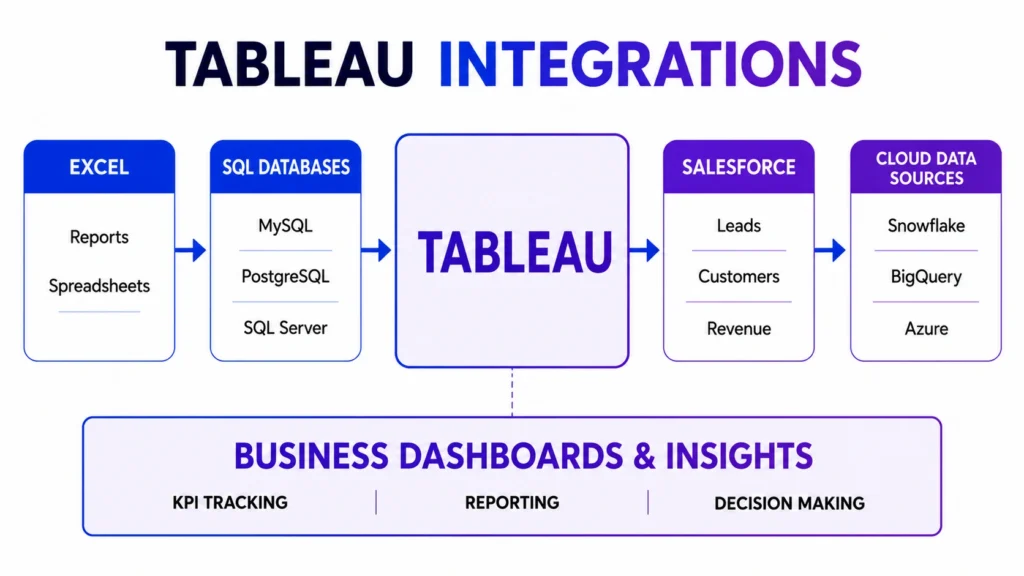
Tableau and Cloud Data Sources
Modern organizations increasingly rely on cloud based platforms.
Popular cloud integrations include:
- Google BigQuery
- Amazon Redshift
- Snowflake
- Microsoft Azure
- Google Sheets
Cloud integrations allow Tableau to analyze large scale business data without requiring local storage.
Benefits of Cloud Connectivity
- Scalable analytics
- Faster access to data
- Centralized reporting
- Real time updates
- Better collaboration
As businesses continue moving to the cloud, these integrations become increasingly valuable.

Live Connection vs Extract Connection
When connecting Tableau to data sources, users generally have two options.
1. Live Connection
Tableau directly queries the source whenever a dashboard is opened.
Advantages:
- Real time data
- Always updated
- Ideal for operational dashboards
2. Extract Connection
Tableau stores a snapshot of data for analysis.
Advantages:
- Faster performance
- Reduced server load
- Useful for large datasets
The choice depends on business requirements and reporting needs.
Real-World Example of Tableau Integrations
Consider an e-commerce company.
Its data may come from:
| Business Function | Data Source |
|---|---|
| Sales | Salesforce |
| Customer Data | SQL Database |
| Marketing | Google Analytics |
| Financial Reports | Excel |
| Inventory | Cloud Database |
Using Tableau integrations, all these sources can be connected into a single dashboard.
Decision makers can then monitor:
- Revenue
- Customer Growth
- Marketing ROI
- Inventory Levels
- Product Performance
without switching between multiple systems.
Challenges in Tableau Integrations
While integrations provide significant benefits, analysts may face challenges such as:
- Data Quality Issues: Different systems may contain inconsistent information.
- Duplicate Records: The same customer may appear in multiple sources.
- Data Refresh Delays: Live data depends on source availability.
- Security and Permissions: Organizations must control who can access sensitive information.
Proper data governance helps address these challenges.
Why Tableau Integrations Are Important for Data Analysts
Modern analytics professionals rarely work with a single dataset.
Understanding Tableau integrations helps analysts:
- Access multiple data sources
- Create comprehensive dashboards
- Improve reporting workflows
- Support business intelligence initiatives
- Deliver more accurate insights
As organizations become increasingly data driven, integration skills continue to grow in importance.
Conclusion….
Tableau’s strength extends beyond visualization. Its ability to connect with Excel, SQL databases, Salesforce, and cloud platforms allows organizations to bring together data from different sources and transform it into actionable insights.
For analysts, understanding how Tableau integrations work is an important step toward building scalable dashboards, improving reporting workflows, and supporting data driven decision making across the business.
Learn Tableau and Business Intelligence Skills with Career247
Modern Data Analysts are expected to work with multiple data sources, create dashboards, and communicate insights effectively.
Career247’s Data Analytics with GenAI Course helps learners build practical skills in Tableau, Power BI, SQL, Statistics, Data Visualization, Dashboard Design, Data Storytelling, and real world analytics projects.
By understanding how data flows from source systems to dashboards, learners develop the skills required in today’s analytics and business intelligence roles.
Frequently Asked Questions
Answer:
Prompt engineering is important because AI tools are increasingly used in analytics workflows. Better prompts produce better outputs, saving time and improving analysis quality.
Answer:
Prompt engineering for data analytics means using structured prompts to ask better data questions, generate analysis steps, create code, summarize dashboards, and interpret insights.
Answer:
Yes, prompt engineering can help generate SQL queries, explain SQL logic, write Python Pandas code, debug errors, and create data analysis workflows.
Answer:
Yes, data analysts should learn prompt engineering because AI tools are becoming part of Excel, SQL, Python, Tableau, Power BI, reporting, and dashboard workflows.
Answer:
No, prompt engineering is not enough by itself. Data analysts still need Excel, SQL, Python, statistics, visualization, data cleaning, and business understanding.
Frequently Asked Questions
Answer:
Tableau integrations allow users to connect Tableau with various data sources such as Excel, SQL databases, Salesforce, cloud platforms, and business applications.
Answer:
Yes. Tableau can directly connect to Excel workbooks and use the data for analysis, reporting, and dashboard creation.
Answer:
Yes. Tableau supports connections to popular databases including MySQL, PostgreSQL, SQL Server, Oracle, Snowflake, and others.
Answer:
Yes. Tableau provides native connectivity to Salesforce, allowing users to visualize CRM and sales data.
Answer:
Integrations enable organizations to combine data from multiple systems, improve reporting accuracy, and create centralized dashboards for better decision making.

