
Data Analytics Interview Questions
Essential Data Analytics Interview Questions Covering SQL, Excel, and Python
Preparing for a data analytics interview requires more than understanding theories and concepts. Employers today expect candidates to demonstrate practical knowledge of tools such as SQL, Excel, and Python, which are essential for analyzing data, generating insights, and supporting business decisions.
Whether you are a beginner entering the field or an experienced professional seeking a new opportunity, understanding the most common data analytics interview questions can significantly improve your chances of success. Interviewers often focus on technical skills, problem-solving abilities, and real-world applications of data analytics tools.

Why Employers Focus on SQL, Excel, and Python
Modern organizations generate enormous amounts of data every day, and businesses need professionals who can turn that data into meaningful insights. This is why SQL, Excel, and Python continue to be the most sought-after skills in the analytics industry. Employers frequently include these topics in data analytics interview questions because they directly relate to the daily responsibilities of a data analyst.
SQL: The Foundation of Data Analysis
SQL is the primary language used to interact with databases. Since most business data is stored in relational databases, analysts must know how to extract, filter, and organize information efficiently.
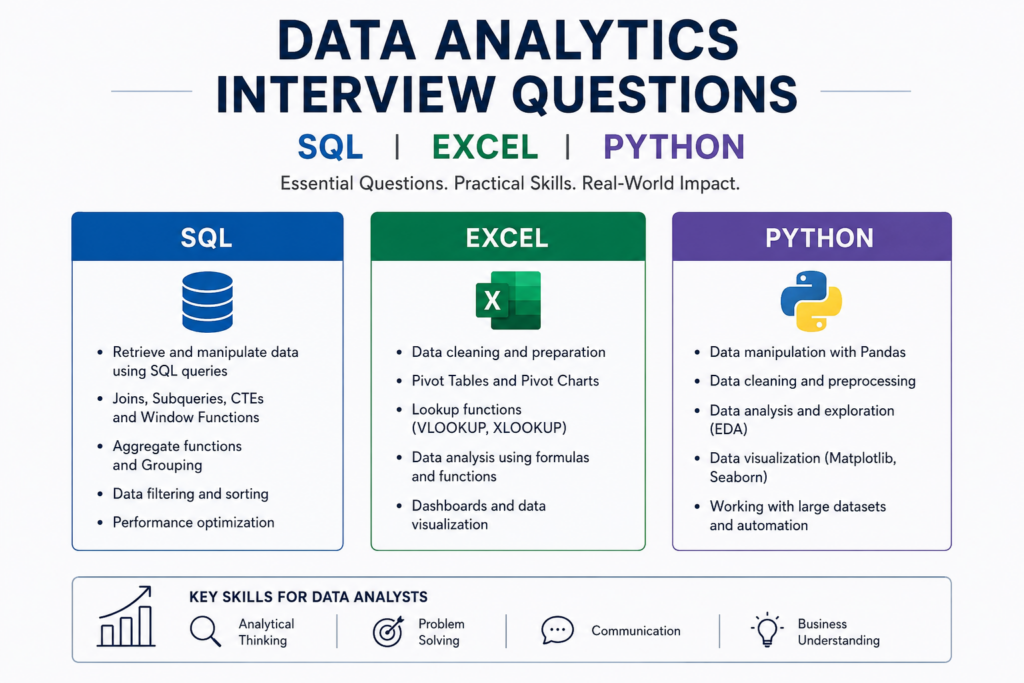
Key SQL skills employers look for include:
- Writing SELECT, WHERE, and ORDER BY queries
- Using JOINs to combine data from multiple tables
- Working with GROUP BY and aggregate functions
- Creating subqueries and Common Table Expressions (CTEs)
- Optimizing queries for better performance
Without SQL, analysts would struggle to access the data needed for reporting and decision-making, making it one of the most common topics in data analytics interview questions.
Excel: Still a Business Essential
Although advanced analytics tools are becoming more popular, Excel remains a critical part of business operations. Many teams still rely on Excel for reporting, budgeting, forecasting, and performance tracking.
Employers often expect candidates to be comfortable with:
- Pivot Tables and Pivot Charts
- VLOOKUP, XLOOKUP, and INDEX-MATCH functions
- Data cleaning and validation
- Conditional formatting
- Dashboard and report creation
Excel’s flexibility allows analysts to quickly explore data and communicate findings to stakeholders, which is why it continues to appear in data analytics interview questions across industries.
Python: Powering Advanced Analytics
As companies handle larger datasets and more complex business problems, Python has become an essential skill for modern data analysts. It helps automate repetitive tasks and perform deeper analysis that would be difficult in spreadsheets alone.
Common Python applications include:
- Data cleaning and transformation
- Exploratory data analysis (EDA)
- Data visualization
- Statistical analysis
- Machine learning and predictive modeling
- Workflow automation
Libraries such as Pandas, NumPy, Matplotlib, and Scikit-learn have made Python a powerful tool for extracting insights from data, making Python-related data analytics interview questions increasingly common.
Why These Three Skills Matter Together
Employers are not just looking for expertise in a single tool. They want professionals who can combine SQL, Excel, and Python to solve business problems effectively.
A typical workflow may involve:
- Using SQL to extract data from a database.
- Cleaning and validating the data in Excel.
- Performing advanced analysis with Python.
- Creating reports and visualizations for decision-makers.
Candidates who can work across all three platforms demonstrate versatility and are often considered stronger hires.
What Employers Evaluate During Interviews
When asking data analytics interview questions, hiring managers aim to assess more than technical knowledge. They want to understand how candidates apply these tools to real-world scenarios.
Interviewers typically evaluate:
- Problem-solving ability
- Data interpretation skills
- Logical thinking
- Business understanding
- Technical proficiency
- Communication of insights
Strong SQL, Excel, and Python skills show that a candidate can confidently handle data from collection to analysis and reporting, making them valuable assets in today’s data-driven organizations.

1. What is the difference between SQL WHERE and HAVING clauses?
Answer
The WHERE and HAVING clauses are both used to filter data in SQL, but they are applied at different stages of query execution. This distinction is one of the most frequently asked data analytics interview questions because it demonstrates a candidate’s understanding of SQL query processing.
The WHERE clause filters individual rows before any grouping or aggregation occurs. For example, if a company wants to analyze orders placed only in the year 2025, the WHERE clause can filter those records before calculations are performed.
The HAVING clause, on the other hand, is used after data has been grouped using the GROUP BY statement. It filters aggregated results rather than individual rows. For example, after grouping sales by region, HAVING can be used to display only those regions where total sales exceed a certain amount.
In practical business scenarios, analysts often combine WHERE, GROUP BY, and HAVING to generate detailed reports. Using the wrong clause can lead to query errors or incorrect results. Understanding when and how to use these clauses effectively demonstrates strong SQL knowledge and is a valuable skill for any data analyst.
2. How would you identify duplicate records in SQL?
Answer
Duplicate records are a common data quality issue that can negatively impact reporting and decision-making. Identifying and removing duplicates is an important responsibility for data analysts.
One common method involves using the GROUP BY statement combined with the COUNT() function. By grouping records based on fields that should be unique and counting occurrences, analysts can quickly identify values that appear multiple times.
For example, if customer email addresses are expected to be unique, grouping records by email and checking for counts greater than one can reveal duplicates. Another approach involves using SQL window functions such as ROW_NUMBER(), which assigns a unique sequence number to records within groups. This method is particularly useful when analysts need to retain one record while removing the rest.
Duplicate records can occur due to system integration issues, manual entry errors, or data migration problems. If left unresolved, they can inflate metrics, distort customer counts, and create inaccurate reports.
Because data quality is a critical aspect of analytics, interviewers often include duplicate-detection scenarios among their preferred data analytics interview questions to evaluate practical SQL skills.
3. What are Pivot Tables in Excel and why are they important?
Answer
Pivot Tables are one of Excel’s most powerful analytical features and are widely used for summarizing and analyzing large datasets. They allow users to transform raw data into meaningful reports without requiring complex formulas.
A Pivot Table can quickly calculate totals, averages, counts, percentages, and other metrics while organizing data into categories. For example, a sales analyst can summarize monthly revenue by region, product category, or sales representative within minutes.
The major advantage of Pivot Tables is their flexibility. Users can drag and drop fields, rearrange dimensions, apply filters, and create dynamic summaries. This enables analysts to explore data from different perspectives and identify trends or anomalies efficiently.
Businesses rely heavily on Pivot Tables because they simplify reporting and improve decision-making. Instead of manually creating formulas across thousands of rows, analysts can generate actionable insights with just a few clicks.
Interviewers frequently ask about Pivot Tables because they are among the most commonly used Excel features in professional environments. Demonstrating proficiency with Pivot Tables shows that a candidate can efficiently analyze data and create meaningful business reports.
4. How do VLOOKUP and XLOOKUP differ in Excel?
Answer
VLOOKUP and XLOOKUP are both Excel functions used to search for information within a dataset, but XLOOKUP offers several improvements over the traditional VLOOKUP function.
VLOOKUP searches for a value in the first column of a table and returns data from a specified column. While useful, it has limitations. For example, it can only search from left to right and requires users to specify a column index number.
XLOOKUP addresses many of these limitations. It can search both vertically and horizontally, supports exact matches by default, and allows users to define custom responses when no match is found. It also eliminates the need for column index numbers, making formulas easier to maintain.
Consider a scenario where an analyst needs to retrieve customer information based on an ID. XLOOKUP provides a more flexible and reliable solution, especially when datasets change frequently.
Modern organizations increasingly use newer versions of Excel that support XLOOKUP. Therefore, understanding both functions is valuable for data analysts. This topic frequently appears in data analytics interview questions because it evaluates a candidate’s practical Excel skills and ability to work efficiently with business data.
5. Explain the importance of data cleaning in analytics.
Answer
Data cleaning is the process of identifying and correcting inaccuracies, inconsistencies, duplicates, and missing values within a dataset. It is one of the most critical stages of the analytics process because the quality of insights depends directly on the quality of data.
Analysts often spend a significant portion of their time cleaning data before conducting any meaningful analysis. Common data-cleaning tasks include removing duplicate records, standardizing formats, correcting spelling errors, handling missing values, and validating data accuracy.
Poor-quality data can lead to misleading conclusions and costly business decisions. For example, duplicate customer records can inflate customer counts, while missing sales data can distort revenue reports.
Data cleaning also improves the performance of machine learning models and reporting systems. Clean data enables organizations to trust their analytics and make informed strategic decisions.
Because data quality is fundamental to successful analytics projects, interviewers frequently include questions about data cleaning. Candidates who can explain both the technical process and business impact of data cleaning often perform well during interviews.
6. What are Python Pandas and why are they widely used?
Answer
Pandas is one of the most popular Python libraries for data manipulation and analysis. It provides powerful data structures such as DataFrames and Series, allowing analysts to work with structured data efficiently.
DataFrames function similarly to spreadsheets or database tables, making them intuitive for analysts familiar with Excel or SQL. Pandas enables users to import, clean, transform, merge, filter, and analyze data with relatively simple code.
For example, an analyst can use Pandas to combine multiple datasets, calculate performance metrics, identify trends, and prepare reports for stakeholders. It supports various file formats, including CSV, Excel, JSON, and SQL databases.
One reason Pandas is so widely adopted is its ability to handle large datasets more efficiently than traditional spreadsheet tools. It also integrates seamlessly with other Python libraries such as NumPy, Matplotlib, and Scikit-learn.
Understanding Pandas is essential for modern data analysts because it forms the foundation of many analytical workflows. Consequently, Pandas-related topics are among the most common data analytics interview questions involving Python.
7. How would you handle missing values in a dataset using Python?
Answer
Missing values are a common challenge in real-world datasets and can significantly affect analytical results if not handled properly. Therefore, data analysts must understand multiple techniques for managing incomplete data.
Python’s Pandas library provides several methods for handling missing values. One option is to remove rows or columns containing missing data using functions such as dropna(). This approach is suitable when only a small portion of the dataset is affected.
Another method involves replacing missing values using fillna(). Analysts may substitute missing entries with averages, medians, modes, or other statistically appropriate values. In some cases, business rules determine the best replacement strategy.
More advanced approaches include predictive imputation techniques, where machine learning models estimate missing values based on other available information.
The choice of method depends on factors such as dataset size, data distribution, and business objectives. Poor handling of missing data can introduce bias and reduce the accuracy of analytical findings.
Interviewers often ask about missing values because it demonstrates a candidate’s understanding of data preparation and their ability to ensure reliable analytical outcomes.
8. What is the difference between INNER JOIN and LEFT JOIN in SQL?
Answer
INNER JOIN and LEFT JOIN are among the most important SQL concepts because organizations typically store related information across multiple tables.
An INNER JOIN returns only records that have matching values in both tables. If a record exists in one table but not the other, it is excluded from the results. For example, if customer and order tables are joined using INNER JOIN, only customers who have placed orders will appear.
A LEFT JOIN returns all records from the left table and matching records from the right table. If no match exists, NULL values are returned for the right table’s columns. Using the previous example, a LEFT JOIN would display all customers, including those who have never placed an order.
LEFT JOIN is particularly useful for identifying missing relationships or conducting customer retention analysis. Analysts often use it to discover inactive customers, incomplete records, or unmatched transactions.
Understanding joins is critical because database analysis frequently requires combining information from multiple sources. As a result, SQL joins remain one of the most common topics in data analytics interview questions.
9. How can Excel be used for data visualization?
Answer
Data visualization is an essential aspect of analytics because it helps stakeholders understand complex information quickly. Excel provides a wide range of built-in visualization tools that allow analysts to present insights effectively.
Common chart types include bar charts, line charts, pie charts, scatter plots, and area charts. Analysts can use these visualizations to highlight trends, compare performance metrics, and identify patterns within datasets.
Excel also supports conditional formatting, which visually emphasizes important values through color scales, data bars, and icons. This feature helps users quickly identify outliers or performance issues.
Another powerful capability is dashboard creation. By combining Pivot Tables, Pivot Charts, slicers, and interactive elements, analysts can build dynamic dashboards that provide real-time insights.
Although specialized visualization tools exist, Excel remains widely used because it is accessible and familiar to business users. Employers value candidates who can transform raw data into compelling visual stories, making this a popular interview topic.
10. Why is Python preferred for advanced data analytics?
Answer
Python has become one of the most widely used programming languages in data analytics due to its simplicity, flexibility, and extensive ecosystem of libraries. It enables analysts to perform tasks ranging from basic data cleaning to advanced predictive modeling.
One of Python’s greatest strengths is its readability. Even individuals with limited programming experience can learn and understand Python relatively quickly. This accessibility has contributed significantly to its popularity.
Python offers powerful libraries such as Pandas for data manipulation, NumPy for numerical computing, Matplotlib for visualization, and Scikit-learn for machine learning. These tools enable analysts to complete complex tasks efficiently.
Automation is another major advantage. Analysts can automate repetitive reporting processes, reducing manual effort and improving productivity. Python also integrates seamlessly with databases, cloud platforms, APIs, and business intelligence tools.
As organizations increasingly adopt artificial intelligence and machine learning, Python’s importance continues to grow. Candidates who possess strong Python skills are often viewed as valuable assets because they can contribute to both traditional analytics and advanced data science initiatives.
11. What is the difference between a Primary Key and a Foreign Key in SQL?
Answer
Primary Keys and Foreign Keys are fundamental database concepts that help maintain data integrity and establish relationships between tables. Understanding these concepts is essential because most business databases are built using relational database models.
A Primary Key uniquely identifies each record within a table. No two rows can have the same Primary Key value, and it cannot contain NULL values.
A Foreign Key is a column that references the Primary Key of another table, creating a relationship between the two tables.
For example:
- Customer_ID can be the Primary Key in a Customers table.
- The same Customer_ID can be a Foreign Key in an Orders table.
- This relationship helps analysts connect customer information with purchase records.
Why It Matters in Analytics
- Prevents duplicate records.
- Maintains database consistency.
- Simplifies reporting across multiple tables.
- Enables accurate customer and transaction analysis.
Interviewers often ask this question because data analysts frequently work with interconnected datasets stored across several database tables.
12. What are Window Functions in SQL and when would you use them?
Answer
Window Functions perform calculations across a set of rows related to the current row without collapsing the results into a single aggregated output. They are extremely useful when analysts need detailed row-level information along with summary metrics.
Unlike GROUP BY, Window Functions retain all rows in the result set.
Common examples include:
- ROW_NUMBER()
- RANK()
- DENSE_RANK()
- LEAD()
- LAG()
Business Use Cases
- Ranking top-performing sales representatives.
- Comparing monthly sales trends.
- Identifying first and last customer purchases.
- Tracking employee performance over time.
For example, a company may want to rank products based on monthly revenue while still displaying each product individually.
Key Benefits
- Preserves detailed records.
- Improves reporting flexibility.
- Supports advanced analytical calculations.
- Reduces query complexity.
Window Functions are increasingly common in modern analytics roles and frequently appear in advanced SQL interviews.
13. How would you optimize a slow SQL query?
Answer
Database performance is critical when working with large datasets. A poorly written SQL query can significantly impact reporting speed and user experience.
When optimizing a slow query, analysts should first identify performance bottlenecks before implementing improvements.
Common optimization techniques include:
- Creating indexes on frequently searched columns.
- Avoiding SELECT * when only specific fields are needed.
- Filtering data early using WHERE clauses.
- Reducing unnecessary joins.
- Using query execution plans to identify inefficiencies.
Example Scenario
Imagine a sales database containing millions of records. A report that takes five minutes to load can often be reduced to a few seconds through proper indexing and query optimization.
Why Employers Ask This
Organizations process massive amounts of data daily.
Analysts who understand query optimization can:
- Improve reporting speed.
- Reduce server workload.
- Enhance business productivity.
- Support scalable analytics solutions.
14. What is Conditional Formatting in Excel and how is it used in analytics?
Answer
Conditional Formatting is an Excel feature that automatically changes the appearance of cells based on predefined rules.
It allows analysts to quickly identify patterns, trends, and anomalies within large datasets.
For example:
- Highlighting sales below target.
- Identifying duplicate values.
- Displaying color scales for performance metrics.
- Flagging overdue tasks.
Benefits for Data Analysis
- Improves data visibility.
- Reduces manual review time.
- Highlights important business insights.
- Enhances dashboard effectiveness.
Common formatting tools include:
- Color scales.
- Data bars.
- Icon sets.
- Rule-based highlighting.
In business environments, conditional formatting helps decision makers focus on critical information without manually reviewing thousands of rows of data.
15. What is the difference between COUNT(), COUNT(DISTINCT), and COUNT(*) in SQL?
Answer
These functions are commonly used to count records, but each serves a different purpose.
COUNT(*)
Counts all rows in a table, including rows containing NULL values.
COUNT(Column_Name)
Counts only non-NULL values within a specific column.
COUNT(DISTINCT Column_Name)
Counts unique values while removing duplicates.
Example
A customer table may contain:
- 10,000 total records.
- 9,500 email addresses.
- 8,700 unique email addresses.
The results would be:
- COUNT(*) = 10,000
- COUNT(Email) = 9,500
- COUNT(DISTINCT Email) = 8,700
Why This Matters
Analysts frequently need to calculate:
- Unique customers.
- Active users.
- Product categories.
- Sales transactions.
Choosing the wrong counting method can produce misleading business reports.
16. How do you handle large datasets in Python efficiently?
Answer
Large datasets can create memory and performance challenges if not managed properly. Skilled analysts understand techniques that allow Python to process millions of records efficiently.
Some common approaches include:
Using Efficient Libraries
- Pandas
- NumPy
- Polars
- Dask
Data Optimization Techniques
- Loading only required columns.
- Using chunk processing.
- Removing unnecessary variables.
- Converting data types to reduce memory usage.
Performance Improvements
- Vectorized operations.
- Efficient filtering.
- Database-side processing.
- Parallel computing where appropriate.
Real-World Example
An e-commerce company may analyze millions of transactions daily. Efficient Python coding practices can reduce processing times from hours to minutes.
Organizations value analysts who can manage large-scale data without compromising system performance.
17. What is Exploratory Data Analysis (EDA)
Answer
Exploratory Data Analysis (EDA) is the process of examining and understanding data before performing detailed analysis or building predictive models.
The primary goal is to discover patterns, trends, anomalies, and relationships within the dataset.
Key Activities in EDA
- Reviewing summary statistics.
- Identifying missing values.
- Detecting outliers.
- Analyzing distributions.
- Exploring variable relationships.
Common Tools
- Python Pandas
- Matplotlib
- Excel
- Power BI
- Tableau
Benefits
- Improves data quality.
- Identifies hidden insights.
- Supports better business decisions.
- Prevents modeling errors.
EDA is often the first step in any analytics project and demonstrates a structured analytical approach.
18. What is the difference between Correlation and Causation?
Answer
This is one of the most important concepts in analytics because many business decisions depend on correctly interpreting relationships between variables.
Correlation
Correlation indicates that two variables move together.
For example:
- Ice cream sales increase during summer.
- Sunglasses sales also increase during summer.
These variables are correlated.
Causation
Causation means one variable directly influences another.
For example:
- Increased advertising spend generates more website traffic.
- Website traffic increases conversions.
Why Analysts Must Understand This
Mistaking correlation for causation can lead to poor business decisions.
Important considerations include:
- External influencing factors.
- Hidden variables.
- Business context.
- Statistical validation.
Strong analysts focus on evidence before claiming cause-and-effect relationships.
19. How would you explain a complex data insight to a non-technical stakeholder?
Answer
Data analysts frequently communicate findings to executives, managers, and clients who may not have technical backgrounds.
The ability to simplify complex insights is often more valuable than technical expertise alone.
Best Practices
- Use simple language.
- Focus on business outcomes.
- Avoid technical jargon.
- Use charts and visualizations.
- Provide actionable recommendations.
Example
Instead of saying:
“The regression model predicts a 12% variance reduction.”
Say:
“Our analysis suggests this strategy could reduce operational costs by approximately 12%.”
Effective Communication Includes
Clear storytelling.
Business-focused insights.
Visual support.
Action-oriented conclusions.
Organizations value analysts who can bridge the gap between data and decision-making.
20. How is Artificial Intelligence changing the role of Data Analysts in 2026?
Answer
Artificial Intelligence is transforming the analytics industry by automating repetitive tasks and accelerating insight generation. However, it is not replacing data analysts. Instead, it is enhancing their capabilities.
Modern AI-powered tools can:
- Generate SQL queries.
- Create dashboards automatically.
- Identify trends and anomalies.
- Produce predictive forecasts.
- Assist with data preparation.
New Responsibilities for Analysts
- Validating AI-generated insights.
- Managing data quality.
- Designing business metrics.
- Interpreting results.
- Communicating recommendations.
Skills Analysts Need in 2026
- SQL expertise.
- Python proficiency.
- AI-assisted analytics.
- Data storytelling.
- Business intelligence tools.
- Prompt engineering for analytics workflows.
As organizations adopt Generative AI and AI-powered analytics platforms, analysts who combine technical skills with business understanding will remain highly valuable. This has become one of the fastest-growing topics in modern data analytics interviews and is increasingly appearing in AI-focused hiring processes.
Conclusion
Preparing for technical interviews requires a solid understanding of SQL, Excel, and Python fundamentals. These tools remain at the core of modern analytics workflows and are frequently assessed during hiring processes. The data analytics interview questions discussed in this guide cover some of the most important concepts that employers expect candidates to understand.
By practicing these data analytics interview questions, working on real-world projects, and strengthening your problem-solving abilities, you can significantly improve your interview performance. Remember that interviewers are not only evaluating technical knowledge but also your ability to apply that knowledge to solve business problems.

