
Top 10 Python Libraries for Data Analysis
Best Python Libraries for Data Analysis
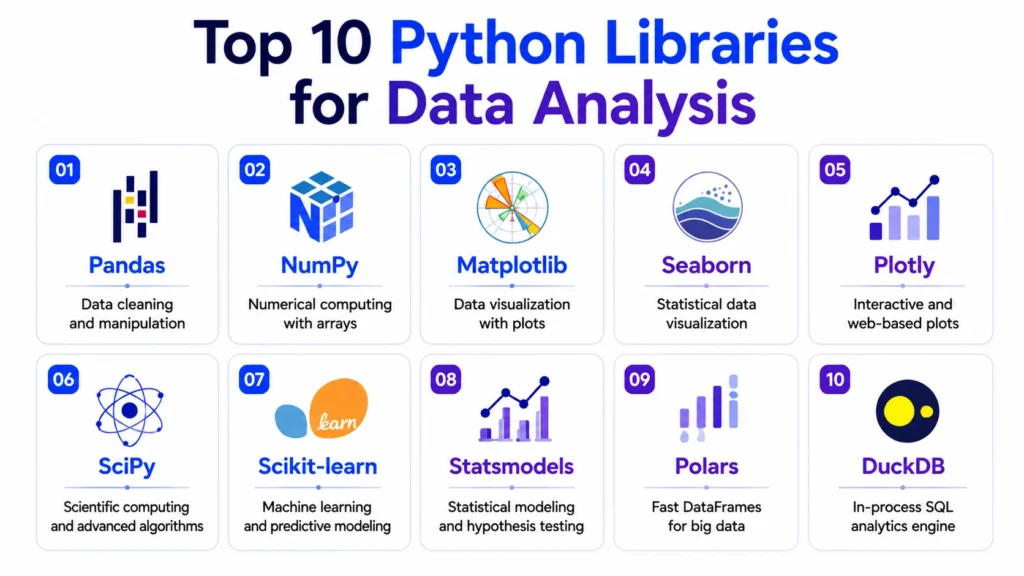
Top 10 Python libraries for data analysis help analysts clean, process, visualize, and interpret data more efficiently. Python has become one of the most important tools in data analytics because it supports everything from basic data cleaning to advanced statistical analysis, visualization, machine learning, and automation.
For beginners, learning Python libraries is important because real-world data is rarely clean or ready to use. Analysts often need to import datasets, handle missing values, transform columns, create charts, identify patterns, and prepare insights for business decisions.

Why Python Libraries are Important for Data Analysis
Python itself is a programming language, but libraries make it powerful for analytics. A library is a collection of ready made functions and tools that help analysts perform specific tasks without writing everything from scratch.
Python libraries are useful because they help with:
- Data cleaning
- Data manipulation
- Numerical calculations
- Statistical analysis
- Data visualization
- Machine learning basics
- Working with large datasets
- Automation
- Reporting and dashboards
In modern analytics, Python is also becoming more important because it works well with AI supported workflows. Analysts can use Python with generative AI tools to write code faster, explain logic, debug errors, and automate repetitive tasks.
Top 10 Python Libraries for Data Analysis
1. Pandas
Pandas is one of the most widely used Python libraries for data analysis. It is mainly used for working with structured data such as CSV files, Excel sheets, SQL tables, and tabular datasets.
- What Pandas is Used For
- Reading and writing datasets
- Cleaning missing values
- Filtering rows and columns
- Grouping and aggregating data
- Merging datasets
- Creating summary tables
Example Use Case: A data analyst can use Pandas to clean sales data, calculate monthly revenue, group customers by region, and prepare a dataset for visualization.
Why It Matters: Pandas is usually the first major Python library beginners learn because most data analysis starts with structured tabular data.
2. NumPy
NumPy is used for numerical computing in Python. It provides powerful support for arrays, mathematical operations, and numerical calculations.
- What NumPy is Used For
- Working with arrays
- Mathematical calculations
- Numerical operations
- Linear algebra
- Statistical calculations
- Supporting other Python libraries
Example Use Case: If you are analyzing large numerical datasets, NumPy helps perform fast calculations on arrays instead of using slow manual loops.
Why It Matters: Many popular libraries such as Pandas, SciPy, and Scikit learn rely on NumPy internally. This makes NumPy a foundation library for data analysis and machine learning.
3. Matplotlib
Matplotlib is a core Python library for data visualization. It is used to create charts and graphs such as line charts, bar charts, scatter plots, and histograms.
What Matplotlib is Used For:
- Line charts
- Bar charts
- Scatter plots
- Histograms
- Custom visualizations
- Basic reporting charts
Example Use Case: A business analyst can use Matplotlib to visualize monthly sales trends, revenue growth, or customer count over time.
Why It Matters: Matplotlib gives strong control over charts, making it useful when analysts need customized visualizations.
4. Seaborn
Seaborn is a statistical visualization library built on top of Matplotlib. It helps create more attractive and informative statistical charts with less code.
What Seaborn is Used For:
- Heatmaps
- Correlation plots
- Distribution plots
- Box plots
- Pair plots
- Statistical visualizations
Example Use Case: A data analyst can use Seaborn to create a correlation heatmap showing relationships between sales, profit, discount, and quantity.
Why It Matters: Seaborn is useful when you want to quickly understand patterns, distributions, and relationships in a dataset.
5. Plotly
Plotly is used for interactive data visualization. It allows users to create charts where viewers can hover, zoom, filter, and interact with the data.
What Plotly is Used For:
- Interactive charts
- Dashboards
- Business reports
- Web based visualizations
- Advanced graphs
Example Use Case: A data analyst can create an interactive sales dashboard where users can explore region-wise performance and product trends.
Why It Matters: Plotly is useful for presentations, dashboards, and business reporting because interactive visuals improve user engagement.
6. SciPy
SciPy is used for scientific and statistical computing. It builds on NumPy and provides advanced mathematical and analytical functions.
What SciPy is Used For:
- Statistical tests
- Optimization
- Probability distributions
- Scientific calculations
- Signal processing
- Linear algebra
Example Use Case: An analyst can use SciPy to perform hypothesis testing or compare whether two business campaigns produced significantly different results.
Why It Matters: SciPy is useful when basic analysis is not enough and you need deeper statistical calculations.

7. Scikit learn
Scikit learn is one of the most important Python libraries for machine learning and predictive analytics. Its official documentation describes it as providing “simple and efficient tools for predictive data analysis” and notes that it is built on NumPy, SciPy, and Matplotlib.
What Scikit learn is Used For:
- Regression
- Classification
- Clustering
- Model evaluation
- Feature preprocessing
- Predictive analytics
Example Use Case: A data analyst can use Scikit learn to build a customer churn prediction model or segment customers using clustering.
Why It Matters: Even if you are not a data scientist, basic Scikit-learn knowledge helps you understand predictive analysis and machine learning workflows.
8. Statsmodels
Statsmodels is used for statistical modeling and hypothesis testing. It is useful when analysts need more detailed statistical outputs compared to basic Python calculations.
What Statsmodels is Used For:
- Regression analysis
- Time series analysis
- Hypothesis testing
- Statistical summaries
- Econometric modeling
Example Use Case: A business analyst can use Statsmodels to understand how advertising spend, pricing, and discounts affect sales.
Why It Matters: Statsmodels is helpful for learners who want to understand the statistical reasoning behind business data.
9. Polars
Polars is a modern DataFrame library designed for fast data processing. It is known for performance and memory efficiency, especially when working with larger datasets. The Polars ecosystem documentation also highlights interoperability with machine learning tools such as Scikit learn.
What Polars is Used For:
- Fast data manipulation
- Large dataset processing
- Lazy evaluation
- Data transformation
- High performance analytics
Example Use Case: If a dataset is too large or slow in Pandas, Polars can help process the data faster and more efficiently.
Why It Matters: Polars is becoming popular because analysts increasingly work with larger datasets and need faster processing.
10. DuckDB
DuckDB is an in-process analytical database that works well with Python. It allows analysts to run SQL queries directly on files such as CSV and Parquet without setting up a separate database server. Recent analytics discussions often compare DuckDB with Pandas and Polars for performance and workflow efficiency on larger datasets.
What DuckDB is Used For:
- SQL analytics in Python
- Querying CSV and Parquet files
- Fast analytical queries
- Local data warehouse style work
- Large dataset exploration
Example Use Case: A data analyst can use DuckDB to query large CSV files using SQL without importing everything into Pandas first.
Why It Matters: DuckDB is useful for analysts who know SQL and want fast local analytics inside Python workflows.
Comparison of Top Python Libraries for Data Analysis
| Library | Best For | Beginner Use |
|---|---|---|
| Pandas | Data cleaning and manipulation | Must-learn |
| NumPy | Numerical computing | Must-learn |
| Matplotlib | Basic visualization | Must-learn |
| Seaborn | Statistical visualization | Useful |
| Plotly | Interactive charts | Useful |
| SciPy | Scientific and statistical computing | Intermediate |
| Scikit learn | Predictive analytics and ML | Intermediate |
| Statsmodels | Statistical modeling | Intermediate |
| Polars | Fast DataFrame processing | Advanced beginner |
| DuckDB | SQL analytics on files | Advanced beginner |
Which Python Libraries Should Beginners Learn First?
Beginners should not try to learn all libraries at once. A practical learning path is:
- Start with Pandas for data cleaning and manipulation.
- Learn NumPy for numerical operations.
- Use Matplotlib for basic charts.
- Learn Seaborn for statistical visualizations.
- Move to Plotly for interactive visuals.
- Learn Scikit learn when you start predictive analytics.
- Explore Polars and DuckDB when working with larger datasets.
This order keeps the learning journey simple and practical.
Python Libraries and Generative AI in Data Analytics
Generative AI is changing how analysts use Python. Instead of writing every line manually, analysts can use AI tools to generate Pandas code, explain SQL queries, debug errors, create visualization logic, and summarize results.
However, AI should not replace fundamentals. Analysts still need to understand what the code is doing, whether the analysis is correct, and whether the output makes sense for the business problem. Gartner has noted that AI agents are expected to augment or automate a large share of business decisions in the coming years, which makes AI fluency and analytics fundamentals more important together.
For learners, this means Python, analytics, and GenAI should be learned together in a practical way. A structured program like Career247’s Data Analytics with GenAI Course can help learners understand Python libraries, dashboards, real world projects, and AI supported analytics workflows without depending only on random tutorials.
Real World Data Analysis Workflow Using Python Libraries
A typical workflow may look like this:
- Use Pandas to load and clean the data.
- Use NumPy for calculations.
- Use Seaborn or Matplotlib for exploratory visualizations.
- Use Statsmodels or SciPy for statistical analysis.
- Use Scikit learn for predictive modeling.
- Use Plotly for interactive charts.
- Use DuckDB or Polars when the dataset becomes large.
This workflow helps analysts move from raw data to insights in a structured way.
Conclusion….
These Top 10 Python libraries for data analysis help analysts handle almost every stage of the analytics workflow, from data cleaning to visualization and predictive modeling.
- Pandas and NumPy are essential for beginners, Matplotlib and Seaborn help with visualization, while Scikit learn, Statsmodels, Polars, and DuckDB support more advanced analytics workflows.
- For anyone planning to build a career in data analytics, Python libraries are not optional anymore.
- They help analysts work faster, automate repetitive tasks, analyze larger datasets, and create better insights.
When combined with SQL, Excel, Tableau, and GenAI supported workflows, Python becomes a powerful skill for modern data analysts.
Frequently Asked Questions
Answer:
Pandas is usually considered the most important Python library for data analysis because it helps with data cleaning, manipulation, filtering, grouping, and preparing datasets.
Answer:
Matplotlib, Seaborn, and Plotly are commonly used for data visualization. Matplotlib is good for basic charts, Seaborn is useful for statistical charts, and Plotly is strong for interactive visuals.
Answer:
Python is very useful for data analysis, but analysts should also learn Excel, SQL, statistics, and dashboard tools like Tableau or Power BI for real-world business analytics roles.
Answer:
Beginners should start with Pandas, then learn NumPy, Matplotlib, and Seaborn. After that, they can move to Scikit learn, Plotly, Polars, and DuckDB.
Answer:
GenAI can help generate Python code, explain errors, suggest visualizations, summarize datasets, and speed up analysis. However, analysts must verify the output and understand the logic.

