
Data Joining in Tableau
Understanding Joins in Tableau for Data Analytics
Data joining in Tableau is one of the most important concepts in data preparation and analysis. In real world analytics projects, data is often stored across multiple tables rather than in a single dataset. Tableau allows analysts to combine these related datasets using joins, making it possible to create more meaningful and accurate visualizations.
Understanding joins in Tableau is essential for working with relational databases, combining business data, and building professional dashboards. Whether you are analyzing customer data, sales records, or operational reports, proper data joining techniques help create a unified view of information for better insights and decision making.

What is Data Joining in Tableau?
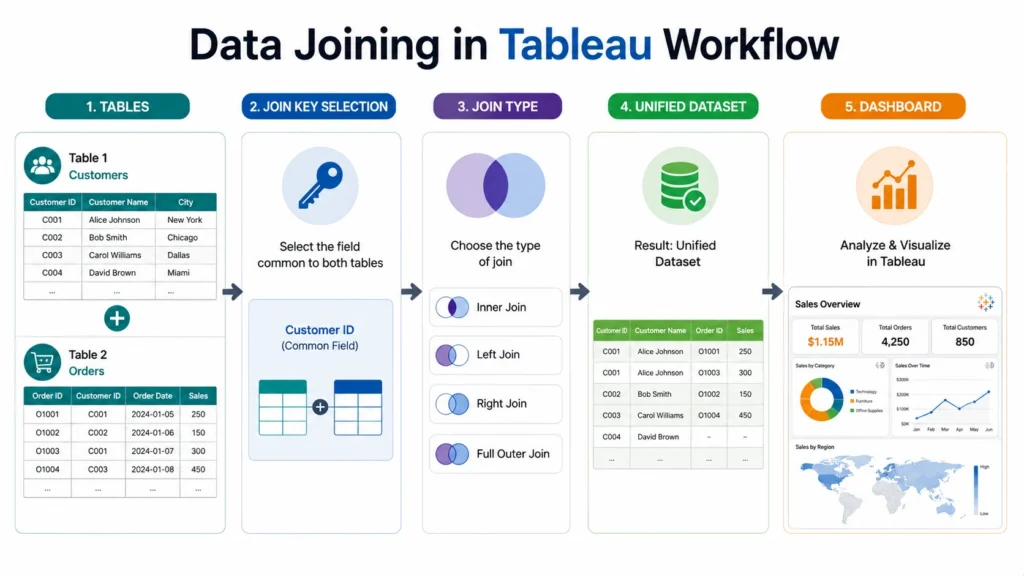
Data joining in Tableau is the process of combining data from two or more tables using a common field. In simple terms, it merges related datasets into a single table for analysis.
Example:
- You may have: Customer Table and Orders Table
- Both tables connected using: Customer ID
Tableau combines matching records from both tables into one dataset.
Why Data Joining is Important in Tableau
Using data joining in Tableau helps:
- Combine related business data
- Create unified dashboards
- Improve analytical accuracy
- Reduce manual data preparation
- Perform deeper analysis
Without joins, analyzing connected datasets becomes difficult and less efficient.
How Joins in Tableau Work
Tableau performs joins at the data source layer. Tableau visually displays joins using Venn diagram like icons.
Basic Process:
- Connect first dataset
- Add another table
- Select common field
- Choose join type
- Analyze merged data
Difference Between Data Joining and Data Blending in Tableau
| Feature | Data Joining in Tableau | Data Blending in Tableau |
|---|---|---|
| Level | Data source level | Visualization level |
| Dataset | Combined physically | Combined logically |
| Performance | Faster | Sometimes slower |
| Flexibility | Moderate | Higher for separate granularities |
Common Join Keys in Tableau
Join keys are fields used to connect tables. Choosing the correct join key is critical for accurate analysis.
Examples:
- Customer ID
- Product ID
- Order ID
- Employee ID

Types of Joins in Tableau
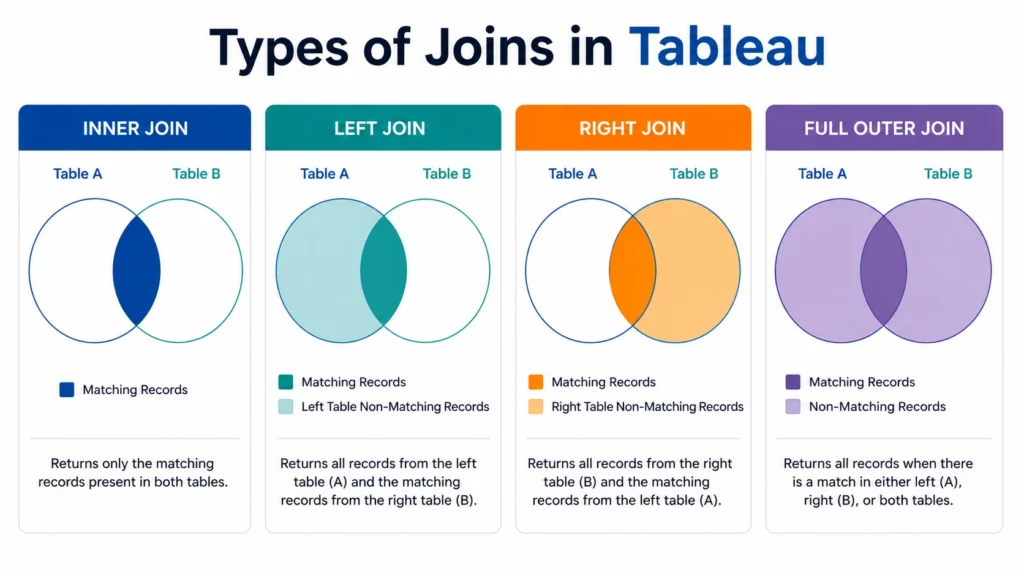
There are multiple types of joins in Tableau, each used for different analytical requirements.
1. Inner Join in Tableau
An inner join returns only matching records from both tables. Best for analyzing connected data only.
- Example: Customers who placed orders
- Characteristics: Removes unmatched rows and most commonly used join
Example Scenario:
- Table 1: Customer IDs: 1, 2, 3
- Table 2: Customer IDs: 2, 3, 4
- Result: Only IDs 2 and 3 appear.
2. Left Join in Tableau
A left join returns:
- All rows from left table
- Matching rows from right table
Unmatched records become NULL.
- Example: All customers including those without purchases
- Useful when primary table data must always remain visible.
3. Right Join in Tableau
A right join returns:
- All rows from right table
- Matching rows from left table
- Similar to left join but reversed.
4. Full Outer Join in Tableau
A full outer join returns:
- All rows from both tables
- Unmatched values appear as NULL.
- Useful for identifying missing relationships between datasets.
Example: Complete overview of customers and orders
Real World Example of Data Joining in Tableau
A retail company stores data in separate tables:
- Table 1: Customer Information
- Table 2: Sales Transactions
- Table 3: Product Details
Using joins: Tableau combines all tables using IDs
Result: A complete dashboard showing:
- Customer purchases
- Product performance
- Regional sales trends
Common Problems in Data Joining
- Duplicate Records: Incorrect joins can create repeated rows.
- NULL Values: Happen when matching records do not exist.
- Wrong Join Relationships: Incorrect join fields can distort analysis.
- Performance Issues: Large datasets with multiple joins may slow Tableau dashboards.
Joins vs Relationships in Tableau
Modern Tableau versions also support relationships.
| Feature | Joins | Relationships |
|---|---|---|
| Combination Type | Physical | Logical |
| Flexibility | Lower | Higher |
| Duplication Risk | Higher | Lower |
Relationships provide flexibility, but joins remain essential for many analytical tasks.
Advanced Data Joining Techniques in Tableau
- Multi Table Joins: Combining multiple datasets simultaneously.
- Cross Database Joins: Joining tables from different databases.
- Conditional Joins: Using multiple matching conditions.
Advanced Data Joining Techniques in Tableau
Conclusion….
Understanding data joining in Tableau is essential for working with relational datasets and creating meaningful analytical dashboards. By learning different joins in Tableau such as inner join, left join, right join, and full outer join, analysts can combine related datasets effectively and uncover deeper insights from business data.
In practical data analytics projects, the ability to structure and merge data correctly is a highly valuable skill. Learning data joining techniques through hands on Tableau projects helps improve analytical thinking and dashboard building capabilities.

Frequently Asked Questions
Answer:
Data joining in Tableau is the process of combining multiple tables using common fields for analysis.
Answer:
Joins in Tableau combine related datasets at the data source level.
Answer:
Inner join, left join, right join, and full outer join.
Answer:
Joins combine data physically at source level, while blending combines data at visualization level.
Answer:
It helps create unified datasets for accurate analysis and dashboard creation.

