
Calculated Fields and Parameters in Tableau
Calculated Fields and Parameters in Tableau for Calculations
Calculated fields and parameters in Tableau are essential features that allow users to perform advanced calculations, create dynamic visualizations, and enhance data analysis. While basic charts rely on existing data, calculated fields enable you to create new data from existing fields, and parameters allow users to interactively control those calculations.
For anyone working in data analytics, mastering these concepts is critical for building intelligent, flexible, and professional dashboards in Tableau.

What are Calculated Fields in Tableau?
Calculated fields are custom fields created using formulas to transform or derive new data from existing datasets.
In simple terms: They allow you to create new columns based on logic or calculations.
Why Use Calculated Fields?
Calculated fields are used to:
- Perform mathematical operations
- Apply business logic
- Create KPIs and metrics
- Transform raw data into meaningful insights
Types of Calculations in Tableau
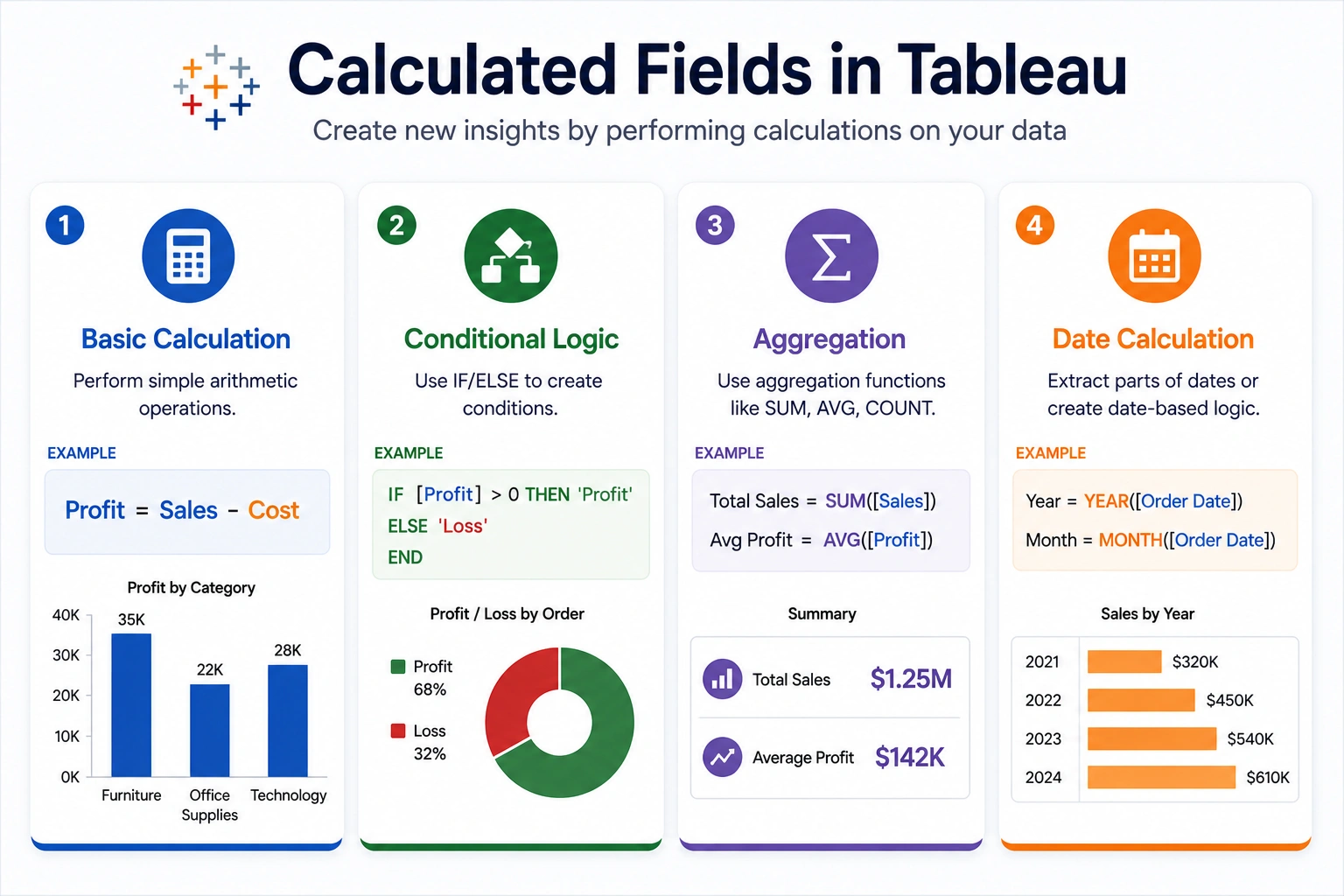
1. Basic Calculations
- Addition, subtraction, multiplication
- Example: Profit = Sales – Cost
2. Aggregated Calculations
- SUM, AVG, COUNT
- Example: AVG(Sales)
3. Conditional Calculations
IF, CASE statements
Example:
IF [Sales] > 5000 THEN "High"
ELSE "Low"
END
4. Logical Calculations
- AND, OR, NOT
5. String Calculations
- Concatenation, formatting
6. Date Calculations
- Extract year, month
How to Create a Calculated Field in Tableau
Step by step:
- Right click in Data Pane
- Select “Create Calculated Field”
- Write formula
- Click OK
The new field will appear in your data pane.

What are Parameters in Tableau?
Parameters are dynamic values that allow users to control calculations and visualizations.
In simple terms: Parameters act like user input controls.
Why Use Parameters
Parameters help in:
- Creating dynamic dashboards
- Allowing user interaction
- Switching between metrics
- Controlling filters and calculations
Types of Parameters in Tableau
- Integer Parameters: Whole numbers
- Float Parameters: Decimal values
- String Parameters: Text based options
- Date Parameters: Date selection
How Parameters Work with Calculated Fields
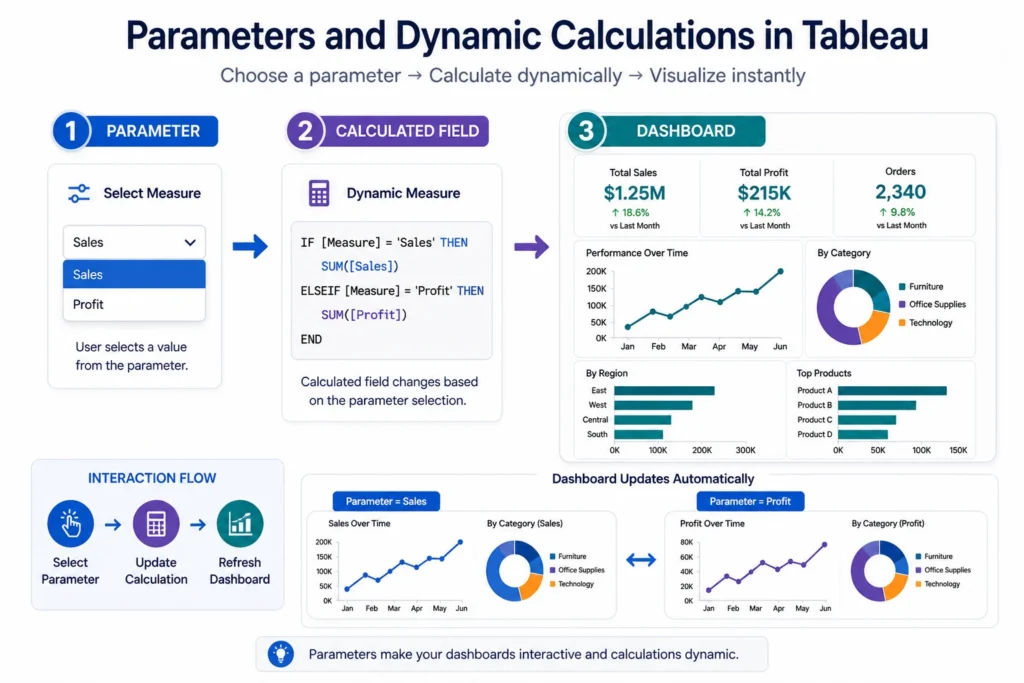
Parameters are often combined with calculated fields to create dynamic logic.
Example:
User selects: Sales and Profit.
Formula:
CASE [Select Metric]
WHEN "Sales" THEN SUM([Sales])
WHEN "Profit" THEN SUM([Profit])
END
Output changes based on user selection.
Real World Use Cases
- Dynamic KPI Switching: Users toggle between revenue and profit
- What If Analysis: Change discount percentage and see impact
- Scenario Analysis: Simulate different business conditions
- Interactive Dashboards: Users control views dynamically
Best Practices for Using Calculated Fields and Parameters
- Keep formulas simple and readable
- Use meaningful field names
- Avoid overly complex nested logic
- Use parameters only when needed
- Test calculations before applying
Common Mistakes to Avoid in Calculated Fields and Parameters
- Writing complex unreadable formulas
- Misusing aggregation functions
- Not validating calculations
- Overusing parameters unnecessarily
Advanced Concepts….
- Nested Calculations: Combine multiple formulas
- Parameter Actions: Trigger changes based on user interaction
- Dynamic Filters: Control filters using parameters
The final verdict is….
Understanding calculated fields and parameters in Tableau is essential for performing advanced data analysis and building interactive dashboards.
Calculated fields allow you to create meaningful metrics, while parameters enable dynamic user driven insights. Together, they transform static dashboards into powerful analytical tools, making Tableau a highly flexible and efficient platform for modern data analytics.

Frequently Asked Questions
Answer:
Calculated fields in Tableau are custom formulas used to create new data from existing fields.
Answer:
Parameters are user controlled inputs used to create dynamic visualizations and calculations.
Answer:
They are used to control calculations, filters, and dashboard interactions.
Answer:
Calculated fields perform calculations, while parameters allow user interaction.
Answer:
Yes, parameters are often combined with calculated fields to create dynamic dashboards.

