
Linear Search in C++
Linear Search in C++
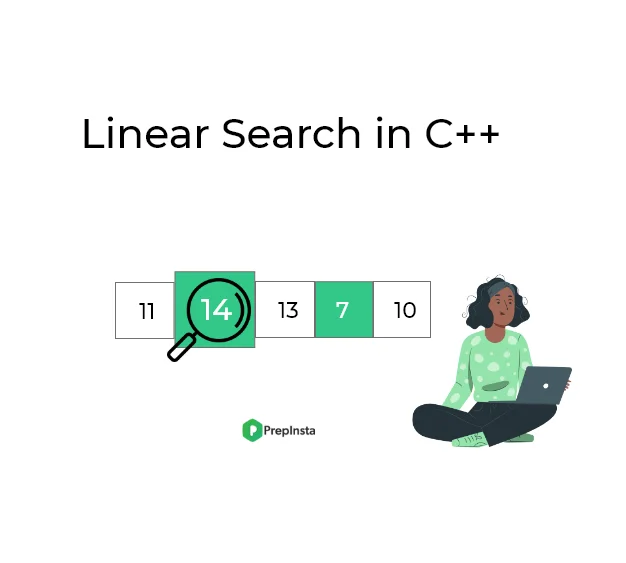
Linear Search in C++ is one of the simplest and easiest searching techniques used in programming. It helps you find a specific value in a list or an array by checking each element one by one from the beginning. If the value is found, it returns the position; if not, it tells you the element doesn’t exist.
Linear search is one of the simplest algorithms of data structure.
- The element to be searched is compared with every element of the list one by one
- Until the element that is to be searched is found.
- If the element is not found till the end this means that the element is not present in the list.
Algorithm to implement linear search in C++
Linear Search is a simple algorithm used to find an element in a list by checking each element one by one. Algorithm to implement Linear Search in C++:
- Read the item to be searched by the user.
- Compare the search element with the first element in the list.
- If they both matches, terminate the function.
- Else compare the search element with the next element in the list.
- Repeat steps 3 and 4 until the element to be search is found.
| Time Complexity | O(n) |
| Best Case | O(1) |
| Worst Case | O(n) |
| Space Complexity | O(1) |
| Avg. Comparisons | (n+1)/2 |
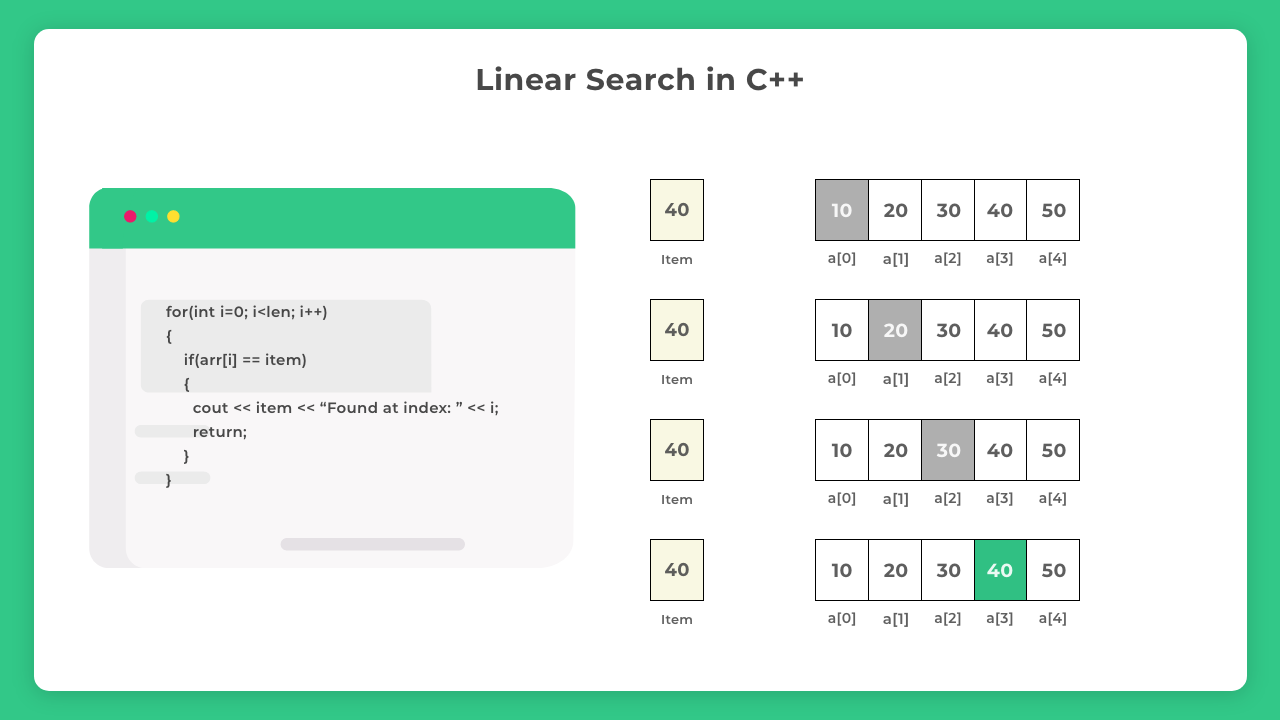
Program to implement linear search algorithm in C++
Iterative Method:
#include<iostream>
using namespace std;

void LinearSearch(int arr[], int len, int item){

    for(int i=0;i<len;i++){
        if(arr[i] == item){
            cout << item << " Found at index : " << i;
            return;
        }
    }
    cout << "Not found";

}

int main() {
    int arr[] = {10, 5, 15, 21, -3, 7};

    // calculating length of array
    int len = sizeof(arr)/sizeof(arr[0]);

    // item to be searched
    int item = 21;
    LinearSearch(arr, len, item);

    return 0;
}
// space complexity: O(N)
// time complexity : O(N)
Output:
21 Found at index : 3

Method 2 (Using Recursion)
This method uses recursion in c++ :
// Time Complexity : O(N)
// Space Complexity : O(1)
// Auxiliary Space Complexity : O(N) due to function call stack
#include<iostream>
using namespace std;

int LinearSearch(int arr[], int index, int item)
{
    if(arr[index] == item)
        return index;
    else if (index == -1)
        return -1;

    return LinearSearch(arr, index - 1, item);
}

int main()
{
    int arr[] = {10, 5, 15, 21, -3, 7};

    // calculating length of array
    int len = sizeof(arr)/sizeof(arr[0]);

    // item to be searched
    int item = 21;

    int index = LinearSearch(arr, len - 1, item);

    if(index >= 0)
        cout << "Item found at index: " << index;
    else
        cout << "Item not found";

    return 0;
}
Output
Item found at index: 3

Method 3 : Linear Search Using STL (std :: find)
Algorithm
- Start
- Input the size of the array (n)
- Input the array elements
- Input the key to search
- Use std::find from <algorithm> header to search for the key in the array
- If iterator returned by std::find is not equal to arr + n,
→ Element is found, print index - Else
→ Element is not found - End
#include <iostream>
#include <algorithm> // for std::find
using namespace std;

int main() {
int n, key;
cout << "Enter the size of the array: ";
cin >> n;

int arr[n];
cout << "Enter the elements of the array:\n";
for(int i = 0; i < n; i++) {
cin >> arr[i];
}

cout << "Enter the element to search: ";
cin >> key;

// Using std::find to perform linear search
auto it = find(arr, arr + n, key);

if (it != arr + n) {
cout << "Element found at index " << (it - arr) << endl;
} else {
cout << "Element not found in the array." << endl;
}

return 0;
}
Sample Output:
Enter the size of the array: 5
Enter the elements of the array:
10 20 30 40 50
Enter the element to search: 30
Element found at index 2
Explanation:
- std::find(start_ptr, end_ptr, key) returns an iterator pointing to the first occurrence of key if found.
- If the key is not found, it returns end_ptr.
- Subtracting the base pointer (arr) from the iterator gives the index of the found element.
Linear search and Binary Search Comparison
- Linear search (Time complexity): O(n)
- Binary search (Time complexity): Log(n)
Examples of Linear Search in C++
Example 1: Linear Search in a Static Integer Array (Iterative Method)
This example demonstrates how to implement linear search using a simple for loop. The array is predefined (static), and we look for a specific integer value by comparing each element one by one.
Code:
#include <iostream>
using namespace std;

int main() {
int arr[] = {4, 15, 7, 23, 11};
int n = sizeof(arr) / sizeof(arr[0]);
int key = 23;
bool found = false;

for (int i = 0; i < n; i++) {
if (arr[i] == key) {
cout << "Element found at index " << i << endl;
found = true;
break;
}
}

if (!found)
cout << "Element not found" << endl;

return 0;
}
Output:
Element found at index 3
Explanation:
- We search for 23 in a hard-coded array using a loop.
- Once found, it prints the index and exits early.
Example 2: Linear Search in a Vector of Strings (Using std::find)
In this example, we use the Standard Template Library (STL) function std::find to search for a string in a vector. This method simplifies the code and works well with C++ containers like vectors.
Code:
#include <iostream>
#include <vector>
#include <algorithm>
using namespace std;

int main() {
vector<string> fruits = {"apple", "banana", "mango", "grape", "kiwi"};
string key = "mango";

auto it = find(fruits.begin(), fruits.end(), key);

if (it != fruits.end()) {
cout << "Fruit found at index " << (it - fruits.begin()) << endl;
} else {
cout << "Fruit not found" << endl;
}

return 0;
}
Output:
Fruit found at index 2
Explanation:
- Searches for “mango” in a vector of strings using std::find.
- It prints the index if found.

Fun Fact!
About Linear Search
We follow linear search in our daily life while finding a specific book, medicine or movie in stores.
Suppose you use Uber application as a rider and you request a ride to go from one place to another. Your driver just arrived at the parking lot of your place.
The only thing you know about the ride is the license plate number. How do you find your Uber ride?
The obvious thing is to go to the parking lot and search all the cars one by one. This method of searching is called linear search, where we search for all possible options until we get our desired result.
Searching
Searching algorithms are easy to learn but are really important for college semester exams and companies offering package between 3 – 6 LPA would ask direct searching questions in online test/ interviews.
- Linear Search –
C | C++ | Java - Binary Search –
C | C++ | Java - Most important –
Time Complexity for Placements - Searching Meme Review
FAQs
Linear Search is a simple method to find an element in a list or array. It checks each item one by one from the beginning until it finds the required value or reaches the end.
Use Linear Search when the data is unsorted or small in size. Binary Search only works on sorted data, but Linear Search does not require sorting.
Linear Search is slower compared to other searching methods like Binary Search, especially for large data. This is because it may need to check every element in the list.
Yes, Linear Search works with arrays, vectors, strings, and even custom objects. You can use a loop or built-in C++ functions like std::find from the STL.
The worst-case time complexity of Linear Search is O(n), where n is the number of elements. This means it may check every item once to find the result.
Linear Search in C
Linear Search in C Programming Language
In this article, you will learn: What is Linear Search in C, How Linear Search works and Time and Space Complexity of the methods for Linear Search with Example Input/Output.
When working with data in C programming, one of the most basic tasks is finding an element in a list or array. This process is called searching. One of the simplest and most intuitive searching techniques is called Linear Search.

What is Linear Search in C?
Linear Search is a straightforward searching technique. It is used to search for an element (called the “key”) inside an array or list.
In Linear Search:
- You start from the first element of the array.
- You compare each element with the key, one by one.
- If a match is found, you return the index (position) of the element.
- If the key is not present in the array, you return -1 or indicate that it was not found.
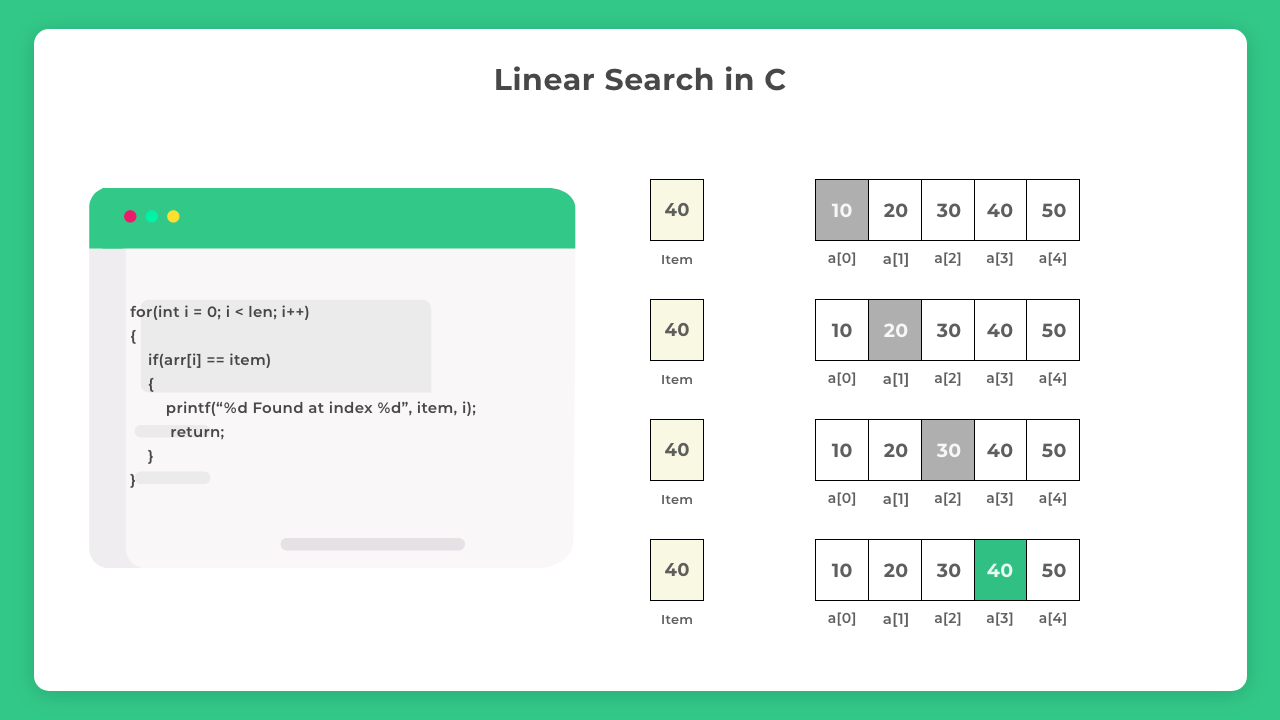
Algorithm of Linear Search:
Here is a step by step explanation of how Linear Search works:
- Start from the first element of the array (index = 0).
- Compare the current element with the key:
If the element matches the key, return its index.
If it does not match, move to the next element.
Repeat step 2 until either:
Key is found.
You reach the end of the array.
If the key is not found after checking all elements, return -1.
2. Does not require the array to be sorted.
3. Works for both small and unsorted arrays.
2. Time complexity is linear — inefficient for big datasets.
Methods to Perform Linear Search
There are 2 common ways to implement Linear Search in C:
- Iterative Method — using loops (for loop or while loop).
- Recursive Method — using recursion (function calls itself).
Prime Course Trailer
Related Banner
Get PrepInsta Prime & get Access to all 200+ courses offered by PrepInsta in One Subscription

Methods to implement Linear Search
Code 1: Iterative Method
#include<stdio.h>

int linearSearch(int arr[], int size, int key) {
    for(int i = 0; i < size; i++) {
        if(arr[i] == key) {
            return i; // Element found, return index
        }
    }
    return -1; // Element not found
}

int main() {
    int arr[] = {10, 25, 35, 45, 50, 60};
    int size = sizeof(arr) / sizeof(arr[0]);
    int key;

    printf("Enter the element to search: ");
    scanf("%d", &key);

    int result = linearSearch(arr, size, key);

    if(result != -1) {
        printf("Element %d found at index %d\n", key, result);
    } else {
        printf("Element %d not found in the array\n", key);
    }

    return 0;
}
Output:
Enter the element to search: 35
Element 35 found at index 2
Code 2: Recursive Method
#include<stdio.h>

int linearSearchRecursive(int arr[], int size, int key, int index) {
    if(index >= size) {
        return -1; // Element not found
    }
    if(arr[index] == key) {
        return index; // Element found
    }
    return linearSearchRecursive(arr, size, key, index + 1);
}

int main() {
    int arr[] = {5, 15, 25, 35, 45, 55};
    int size = sizeof(arr) / sizeof(arr[0]);
    int key;

    printf("Enter the element to search: ");
    scanf("%d", &key);

    int result = linearSearchRecursive(arr, size, key, 0);

    if(result != -1) {
        printf("Element %d found at index %d\n", key, result);
    } else {
        printf("Element %d not found in the array\n", key);
    }

    return 0;
}
Output:
Enter the element to search: 15
Element 15 found at index 1
1. Best Case: The key is found at the first position. Time Complexity = O(1)
2. Average Case: The key is somewhere in the middle. Time Complexity = O(n)
3. Worst Case: The key is not present or at the last position. Time Complexity = O(n)
Overall: Time Complexity = O(n)
2. Only a few extra variables are used (index, key).
Space Complexity = O(1)
Conclusion:
Linear Search is one of the easiest and most basic search algorithms in C.
It is best used for:
- Small arrays.
- Unsorted data.
Although it is not the most efficient search algorithm, learning linear search is essential for beginners because it builds understanding of loops, conditions, and how data is processed.

FAQ's related to Linear Search
Answer:
Linear search in C programming language is a simple search algorithm used to find a specific element in an array or list. In linear search, each element of the array is checked one by one until the desired element (key) is found or the end of the array is reached.
Answer:
To implement linear search in C, you can use either an iterative method using loops (for or while loop) or a recursive function. The basic logic involves comparing each element of the array with the target value. If a match is found, its index is returned. For example, a simple C program for linear search will loop through the array and print the index if the element matches the key.
Answer:
The time complexity of linear search in C is O(n), where ‘n’ is the number of elements in the array. In the worst case, linear search has to check each element one by one, resulting in linear time. The best case is O(1) if the element is found at the first position.
Answer:
Advantages of linear search in C include its simplicity and the fact that it works on unsorted arrays. It is easy to implement and understand. The disadvantages of linear search are that it is not efficient for large datasets and has linear time complexity (O(n)), making it slower compared to binary search for large or sorted arrays.
Answer:
The main difference between linear search and binary search in C is that linear search checks every element one by one, while binary search divides the array and eliminates half the search space in each step. Linear search works on both sorted and unsorted arrays, whereas binary search requires the array to be sorted. Binary search is more efficient with a time complexity of O(log n), compared to O(n) for linear search.
Get over 200+ course One Subscription
Courses like AI/ML, Cloud Computing, Ethical Hacking, C, C++, Java, Python, DSA (All Languages), Competitive Coding (All Languages), TCS, Infosys, Wipro, Amazon, DBMS, SQL and others
Login/Signup to comment